Regular and effective contact is such hot topic these days, isn’t it?
Canvas’s Announcements tool not only lets you send out fully customized class messages, but stores your communications in an easy-to-retrieve archive list. Using Announcements also supports quality course design by aligning with a number of OEI Course Design Rubric criteria. It's also a great way to create the connection that keeps students engaged and on track. What's not to love?
Let's explore the power of Announcements (in under 4 minutes!).
Equitable Access to Educational Technology Tools
Founded in 1998, the Foundation for California Community Colleges (Foundation) is the official 501(c)(3) auxiliary to the California Community Colleges’ Board of Governors and Chancellor’s Office. Since 1999, the Foundation has operated the CollegeBuys program to support systemwide procurement needs by leveraging the collective purchasing power of the California community colleges to create voluntary cooperative purchasing agreements.
Central to our efforts is the notion that cost should not be a barrier, and all California community college students should have equal access to educational technology tools. Through specially negotiated pricing, CollegeBuys has enabled students to purchase mobile internet service, software, and tablets/computers, which may have otherwise been unaffordable, collectively saving students, faculty, and staff millions of dollars.
One important offering that supports this work is the California Connects Mobile Internet program. A 2016 field poll by the California Emerging Technology Fund shows that 30% of Californians do not have meaningful broadband access at home, and income is a significant factor in broadband adoption rate at home. California Connects provides an affordable home internet option for students that cannot access the internet during conventional school hours. California Connects is only $19.99 a month for 30GB of data and no overage fees, and has already helped to bridge the digital divide for hundreds of students, faculty, and staff across our college system.
Awareness about California Connects and other technology offerings remains a major hurdle for our students and colleagues, so please help spread the word about these discounts on your campus. Electronic versions of outreach materials can be found at https://foundationccc.org/CollegeBuys/Champions-Materials.
On February 22, 2018, @ONE coordinated a free, one-day untethered conference that was part of the national Digital Learning Day celebration. Our event, CCC Digital Learning Day #CCCDLDay, was planned in collaboration with a group of CCC faculty and staff. @ONE opened a call for proposals, arranged a full day of speakers, and invited colleges throughout the state to coordinate on-campus events that would enhance our day-long online program. @ONE has always offered online professional development and we know that is important to reach you, especially those who teach part-time. Our model for untethered professional development fosters a connection between the online program and what's happening on campus, while ensuring all who want to learn and grow can do so without needing to spend a dollar on travel.
When we started planning CCC Digital Learning Day, we did not know what would happen and we did not know what we would learn.
What happened?
We collected attendance data and sent an evaluation survey to all attendees from which we received 119 responses (22% response rate). We invite you to view the data by downloading a PDF of the slides.
Here are some highlights:
Thirty one CCCs (27%) signed up to host an on-campus viewing room or other event.
85 CCCs were represented (3 in 4) by the online and on-campus participants.
1,643 session attendances (online and on-campus duplicated headcount)
531 attendees (online and on-campus unduplicated headcount)
Hundreds of tweets were sent using the hashtag #CCCLearn (a couple of which are embedded to the right)
What did we learn?
Your @ONE team carefully reviewed the attendance and evaluation data. Here is a summary of what we learned.
You want more untethered PD events. Ninety-eight percent of those who responded to the post-event survey said they would likely attend another @ONE untethered conference (74.8% would definitely attend and 23.5% might attend).
Untethered PD is important to our system. You let us know that untethered professional development plays a key role in your professional growth too. Seventh-nine percent of evaluation responses indicated that it increases access to PD and 9.2% sais without it you would not have access to PD at all).
We have to foster more relationships with campuses. The level of engagement from the 85 CCCs represented through the attendances varied. One college, City College of San Francisco, led the way with 68 attendees. We had 16 colleges that had 10 or more attendees (led by San Diego Mesa College, Glendale Community College, Fresno City College, and Long Beach City College), 17 colleges with 2-9 attendees, and 16 colleges with one attendee. We have solid ground in place to build upon at most colleges and work to do at other colleges.
On-campus communications are key to campus-wide PD engagement. Nearly half (47%) of those who responded to the evaluation learned about CCC Digital Learning Day from a campus announcement and, 19% learned about it from the @ONE newsletter (sign up for our newsletter here!), and about 12% learned about it from a colleague. Understanding the impact of campus announcements underscores our need to foster relationships with on campus PD contacts to ensure everyone who wants to learn and grow knows about our offerings.
Earning flex credit is key. Roughly half (47%) of survey respondents shared that they earned flex credit for the sessions they attended on CCC Digital Learning Day. This is an area with which we need your help, as we know that campuses that provided flex credit for CCCDLDay participation had higher attendance rates.
What's Ahead?
@ONE will continue to offer untethered events. Here's what we have in the works rightnow!
New Untethered Events & Programs!
First Fridays: Each month during the academic year, starting in May 2018, we will coordinate a mini, 2-hour online program featuring speakers from across the system. These events will wrap up by early afternoon. We will be listening to your feedback and pivoting based upon what we learn.
Can-Innovate: As the use of Canvas as a common course management gained traction across our system, this annual, one-day conference has been tremendously popular to those who have been able to attend in person in the past. This year, on Friday, August 24, 2018, we'll be taking Can-Innovate online and offering it as an untethered conference. The call for proposals will open in April so starting thinking about what you're doing with Canvas (in your class or on campus) that you'd like to share with your peers across the state and beyond.
What you can do:
Get connected. If you don't already receive the @ONE newsletter sign up now to be sure you receive updates about First Fridays (starting in May) and Can-Innovate (Friday, August 24th).
Speak with your peers about coordinating on-campus activities that complement the 2-hour online program. These may be discussions/hands-on sessions held in the afternoon following the sessions, the next Friday, or throughout the month. Consider integrating the untethered format into your campus events too! Create an inclusive PD culture by inviting those into the discussion who cannot be on campus but still want to learn.
Increase your reach. Social media is a powerful way to connect with more people and share the hard work you are doing on campus. Find your peers who use Twitter for professional growth. Start a Twitter account for your campus PD efforts. Follow your connected peers, encourage more to get involved, and follow @ONE too!
Send us feedback. We are listening. If you haven't noticed, we have a feedback form built into our website to make it easy to send your ideas to the @ONE team. We read every single one! Or if you'd prefer to send an email directly to one or more of our team members, you will find our contact information here.
Thank you for helping us make our first #CCCDLDay at success.
So wonderful to see how @SFDaya collaborated with a faculty in San Diego, and how students interacted with one another through their flipgrid videos. Loved this! #cccdlday
Cool idea from @yourteachermeg on having students create a digital museum exhibit using @AdobeSpark#CCCDLDay "Different from writing a boring paper."- feedback from her student
Via the Online Counseling Network (OCN), counseling faculty statewide are participating in synchronous online counseling which allows them to replicate a face-to-face (f2f) meeting. Working this way has revealed nuances that counselors need to be aware of. I will share two today.
Eye Contact
The position of your computer camera can impact your eye contact as it can present a nonverbal appearance that you are distracted or uninterested even though you may be staring directly at the student on your computer screen. Camera placement can make a significant difference in how you build rapport online. If you have a camera embedded in your computer monitor, I recommend you adjust your monitor to a position where your camera and eyes are horizontally aligned and level. Positioning your camera in such a manner will present a level of eye contact similar to your f2f counseling appointments. If you have a camera separate from your computer monitor, I recommend you either purchase a stand so that you can place the camera at eye level or buy a camera that you can place on the top of your computer monitor and adjust to your eye level.
Student Engagement
During an online counseling appointment, student participation is an essential component to address student learning outcomes (SLO). For example, many counseling departments include an SLO focusing on applying educational planning so that students can identify course requirements that enable a student to pursue their educational goal/s (e.g., associate degree and transfer requirements). A vital nuance is to allow students the ability to moderate some of the session so they can navigate resources such as your online catalog, key websites (e.g., assist.org), and other vital components that enable students to build a meaningful educational plan that is collaborative and critical to the learning process. As a result, students are increasing their educational cultural capital which contributes to their success and college readiness. Educational cultural capital is student’s mastery or preparedness of the college student role (Aschaffenburg & Maas, p.573, 1997). 2008), so the more educational cultural capital a student has then, the students will gain a more in-depth knowledge of their academic expectations.
One of the aspects as a community college counseling faculty I enjoy is growing my knowledge base and implementing new strategies in my counseling sessions, as this helps me become effective in my approach with students. The more you take time to engage in online synchronous counseling the more you will implement effective practices that address the nuances of online counseling. Stay tuned for future posts that discuss other nuances when providing synchronous online counseling.
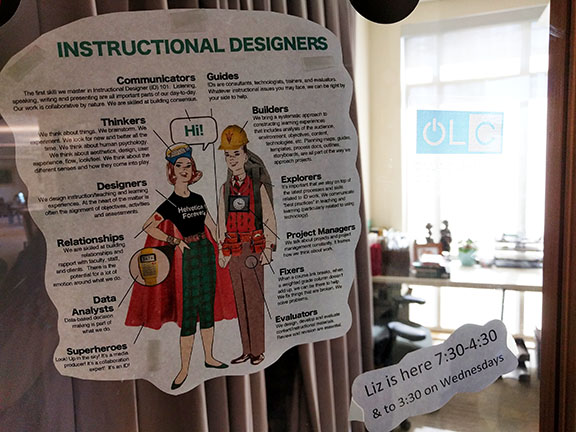
Building Relationships with Faculty as an Instructional Designer
My office door with an illustration by Robert Kilman from the Arizona State University website TeachOnline
When I began my position as the Instructional Designer in Distance Education at Santa Rosa Junior College (SRJC) in the Fall of 2015, my new supervisor printed the illustration shown in the photo above and gave it to me. I taped it to my office door. Who wouldn’t like to be depicted as a fashionable superhero-explorer with a split personality? It’s also a pretty good representation of an action-packed job that marries creative thinking with technical problem-solving. Flexing different parts of my brain throughout the day keeps me excited about my work and on my toes.
Among the many roles I play, the one I reflect upon the most is Relationship Builder. The caption for the illustration states: “We are skilled at building relationships and rapport with faculty, staff, and clients. There is the potential for a lot of emotion around what we do.” The emotion was immediately evident to me at SRJC. My position was created at the same time that our college adopted Canvas to replace Moodle and a home-grown system called CATE. Emotions were loud and clear: many faculty felt overwhelmed by the transition, especially when it meant significantly reorganizing course materials to accommodate the Canvas interface.
Fortunately, many of those faculty attended our in-person Canvas workshops and appointments for help, and I was able to calm nerves by listening carefully to their concerns and providing support. I also encouraged faculty to share problems and solutions with each other. Building face-to-face relationships came easily to me and helped faculty make the transition.
Now that the transition to Canvas is complete, fewer faculty attend our in-person workshops and more often send me emails and enroll in my online courses and programs. I am happy to provide support remotely, but I find that building meaningful relationships with new faculty now requires more deliberate planning and cultivation. I’ll share two of my strategies:
I now use ConferZoom to “meet” new faculty who take our Online Special Expertise certificate training, a six-week online course that I teach in Canvas. I offer Zoom sessions each week, and participants are required to attend at least one session. The stated purpose of this requirement is for faculty to experience the Zoom interface as a teaching tool, but I also value the sessions for relationship building. Conversations take off into many directions, just as they do in person. Sometimes the encounters are even more personal than they would be in person --I’ve met more than a few babies, kids, and pets through Zoom! I’ve also invited guests to join us, including @ONE’s Michelle Pacansky-Brock and Lené Whitley Putz.Zoom session require advance planning (although on occasion I launch Zoom screen-sharing for support calls). For the Online Special Expertise sessions, I survey participants at the start of each course to determine everyone’s availability. I then post session dates as ungraded Assignments in Canvas so the “due dates” appear in Modules, on the Calendar, and in the To Do list. I set up Outlook meetings as a reminder. I also make appointments with faculty who can’t make the sessions, and I note session attendance in Grades to be sure everyone participates. Building new relationships makes it worth the effort.
I interview faculty for my Online Faculty Spotlight video series, which I post on our DE Blog and on YouTube. Response to the series has been very enthusiastic because a common request I hear from faculty who are new to online teaching is to see example Canvas courses. I ask the faculty I interview to imagine they are sharing their course with a colleague who has never taught online before. It’s the type of interaction that might happen informally in offices or workshops, but many of our adjunct faculty miss out on those opportunities for interaction.Some faculty I invite for interviews are hesitant to be recorded at first, but I sit next to them at my computer and we have a conversation while recording with Screencast-o-matic. I promise to edit out anything embarrassing to put them at ease. I ask them to give me a “tour” of their course and explain their teaching goals and strategies. I usually include the webcam so it’s clear who is talking. The videos foster relationships among faculty who may never meet otherwise.
My future plans, if I ever find the time, is to do a podcast. The only slack time I have during the day is lunch, so perhaps I’ll call it “Lunch with Liz at SRJC.” I won’t pull off something as slick as Teaching in Higher Ed while eating, so perhaps I’ll have informal lunch conversations with faculty about kids, pets, or favorite fonts. I keep meaning to get a Helvetica Forever t-shirt.