
Don’t Stress This Test!”: Inclusive Assessment Strategies That May Reduce Test Anxiety and Expand Success

Test Anxiety: A Problem for Students, or Educators, or Both?
Many students in my courses are surprised to encounter the encouraging statements I include with test instructions. These are statements such as:
- Take a deep breath, and do your best. You're gonna do great!
- You belong here. I believe in you. You've got this!
- Enjoy this test! Your creativity is welcome!
As an African American woman educator, who grew up in Southern California, and now teaches introductory linguistics at a community college in the region, I find myself guided by my own previous experiences as a student. My own uninspiring encounters with multiple-choice tests have led me to seek alternative ways of engaging students. I see myself in my students and actively believe in their talents, as you do with those you guide and teach. Throughout this article, I share actual questions and comments I have received and solicited from anonymous students during 2021-2022. These student comments illustrate tests as an affective experience in learning, with the potential to support broader, inclusive course design.
Student #1: “Hi Professor Thomas, I have a question for the test. Do we need to study a specific topic? I just wanted to make sure.”
For many of our students, an upcoming test carries a threatening sense of anxiety and doom. These feelings can build upon previous experiences of limited testing success. Students may worry that test items will implicate a range of topics beyond those they have specifically rehearsed. Or they might anticipate not having enough time during the test to adequately demonstrate their learning.
Student #2: “Hello Professor Thomas, these past few weeks I have been suffering from personal problems. I know I can’t continue missing work because it’ll just add on to my stress. I’m emailing to let you know I am a few assignments behind but am going to make them up. I also appreciate the flexibility of your class and late work policy as it’s given me time to take care of my mental health. Thank you.”
Add to this, that in the U.S. and around the world, students are experiencing increased testing and learning anxiety and mental health concerns. As many as 30% of college students in nursing report anxiety with test-taking. Throughout California, 43% of middle and high school students surveyed in 2021 reported a panic or anxiety attack, and feelings of being “stressed.” Community college students are particularly impacted by the pandemic and related social and economic conditions.
Test anxiety is defined by psychometric specialists as a noncognitive, negative emotion state that “can impair performance by preventing students from applying stored knowledge in a test-taking situation, thereby underestimating the student’s knowledge as measured on an exam” (Cho & Serrano, 2020, p. 192).
With this definition in mind, it is possible that the very experience of testing itself hampers our ability as educators to meaningfully assess student knowledge. Arguably, negative student testing experiences also prevent us from gaining accurate feedback as to how well our students are learning. In this way, test anxiety is as much a problem for students as it is for educators.
As major California universities permanently suspend their reliance on standardized admissions testing, this only underscores the flaws in evaluating human potential largely through traditional, multiple-choice assessments. And yet, much popular advice about “overcoming test anxiety” and becoming a successful test-taker frames the issue as entirely the student’s responsibility. College students are often admonished about their study habits, coping skills, and fears of failure. They are also advised to share their study strategies with one another, and take up regimes of self-care (e.g., eating and sleeping well, meditation, exercise). In reality, these individualized strategies can only help so much, if test design itself is a source of difficulty, bias, and enduring inequity.
So, how can we transform classroom testing—away from a punitive and soul-crushing experience, and into a positive opportunity for growth and learning, particularly in online teaching? Is it possible to maintain academic rigor while shifting our assessment approaches?
Pivoting to Test Design that Centers Student Success
Student #3: “Hi Professor Thomas, my learning disabilities primarily affect my working memory, task initiation, and processing speed. The accommodations that help me the most are extended time on exams and extensions on deadlines if I need them…”
Each semester, I receive multiple requests for extended time by students and their advocates in the campus center for students with disabilities. These accommodations, and the laws and policies that guarantee them, acknowledge that timed testing presents particular challenges to students with disabilities. At the same time, there is ample evidence that students without identified or self-reported disabilities also benefit from additional time.
Furthermore, a growing number of research studies illustrate that:
- Contextualized questions that explicitly connect with students’ everyday lives contribute to student success and confidence in testing;
- Collaborative and cooperative learning lower anxiety, and allow numerous low-stakes opportunities for risk-taking and confidence-building.
With this in mind, I have gradually experimented with test design in my own teaching, something which I encourage other educators to try, as well. Over the course of several semesters, as I saw incremental and transformational success in my students—both on-ground and online (as we shifted to meet pandemic conditions)—I became even more motivated to develop an alternative approach. Now, as a result of these changes, I actually have students in my courses disclosing to me that they look forward to our next test!
Student #4: “I actually really enjoyed our first test together! I completely feel like the test formatting allowed me to convey what I learned about the subject matter.”
Student #5: “I feel the testing format supports my learning and helps me discuss class concepts with classmates.”
Part of my paradigm shift on testing was due to my participation in a CVC/@ONE course, which greatly expanded my appreciation of culturally responsive teaching and learning. Among the many resources I learned of, I continually return to the framework presented by acclaimed educator Geneva Gay (2000) in Culturally Responsive Teaching: Theory, Research, and Practice. In her view, transformative pedagogy should cultivate an environment that centers interpersonal interactivity and “legitimiz[es] personal experiences as significant sources of knowledge” (p. 198). Gay also advocates for:
- Cooperative learning, as opposed to competitive and punitive grading schemes;
- Choice and authenticity in learning through opportunities to choose and determine which response pathway for an assignment helps them best demonstrate their knowledge;
- Incorporating a variety of formats, perspectives, and “novelty in teaching”;
- Multiple opportunities for students to critically reflect on their beliefs and actions (p. 196).
More recently, Andratesha Fritzgerald (2020) builds upon these principles in her book, Antiracism and Universal Design for Learning: Building Expressways to Success. Fritzgerald explains antiracist UDL as beginning with the premise “that all students are capable of learning and really want to learn,” and that it is “our instructional design that prevents them from doing so” (p. 48). This approach insists upon “providing multiple means of engagement, multiple means of representation, and multiple means of action and expression” (p. 49).
Testing as Pedagogy: From Timed Test to Untimed "Video Test Discussions"
Incremental feedback from my students has encouraged me to consider tests, not as opportunities to indicate what they don’t know, but as occasions for exploration and collaborative learning that amplify what they do know. This pedagogical orientation requires us to let go of punitive surveillance models of assessment, and open ourselves up to viewing the test as a holistic experience that we educators can also learn from.
In my on-ground teaching, students complete open-book (use of notes and textbook allowed) tests and quizzes in community—in groups of 2-3 students—and write up their own responses individually.
In the online version of my course, open-ended questions that guide students in applying key concepts to the exploration of data-sets become discussion prompts for individual video/audio replies of up to two minutes each. By creating an untimed test that is available for more than one day, I am building a flexible accommodation into the test design that will benefit all students, independent of whether they have a disability(ies), test anxiety, and/or are experiencing other challenging circumstances.
Before experimenting with this, I had never before encountered video/audio discussions as tests. Therefore, in synthesizing this pedagogy, I am guided by my prior experience as a student, and feedback from my current and past students.
For these reasons, I design all of my tests as weeklong, open-book, asynchronous discussions using the video/audio functions of Flipgrid, an asynchronous video discussion tool provided to educators for free by Microsoft. Flipgrid works on a computer or a phone with the mobile app. I use Canvas to incorporate Flipgrid discussions within the course. To do this, I create discussions on the Flipgrid website, and then add these to my Canvas assignment, using the Canvas setting type of “external tool.” It is important to note that you (or your Canvas administrator) must use the LTI to integrate Flipgrid into Canvas as an external app before setting up an external tool assignment. (Learn more about what the Canvas LTI is and how it works.) This workflow allows for students’ video or audio-only posts to Flipgrid to be viewable to me within the Canvas Speedgrader function, which aids in ease of instructor access, feedback, and grading (though this can also be achieved using the in-situ video/audio discussion functions of an LMS). It also ensures that students’ privacy is protected by eliminating the need for them to create their own Flipgrid accounts.
Settings on Flipgrid can be tailored to further protect privacy: (1) discussions only visible to course members, with (2) students unable to download each other’s videos. This test design is suitable for a range of class sizes, and accommodates students who do not feel comfortable on video, or who prefer visual-gestural modalities, subtitles, automated captioning, and may use signed languages (such as American Sign Language). I also encourage students to bring their creativity, and some have responded by splicing relevant images and music into their exam responses. On the topic of bilingualism, one student even featured a consenting friend from his workplace, who volunteered to translate each of the student’s main insights into Spanish. This bilingual test response showcased the student’s strong engagement with our course content and curiosity to learn beyond the prompt! It also provided a learning opportunity for other students in the class.
Here’s a sample test prompt:
Please post your video comments by Thursday, and reply to at least two of your peers by Saturday. In a brief video or audio-only comment (up to 2 minutes), share:
- Your name
- Have fun connecting with us!
- Something we have studied together this semester that has expanded your appreciation of how language(s) works.
- Mention at least one key term or key concept from Units 1-4 in your post.
- For example: intersectionality, sign language linguistics, prescriptivism, international phonetic alphabet (IPA), and more!
- Provide a definition of your key term or key concept.
- Most important: Explain in detail how it applies to your personal life.
- For example: Consider how the study of articulatory phonetics helps you understand the challenges young children you know (nieces, nephew, sons, daughters, etc.) face when learning to speak.
- Respond to at least 2 of your peers.
Students report enjoying this interactive, untimed format of video test discussions, because it allows them to rehearse, erase, and re-record their responses, as well as learn from and share with other students. In this sense, the ability to receive peer responses provides students with more immediate feedback than a testing format reliant on the instructor as the sole or main respondent. What I gather from student feedback and performance, is that an interactive and open-ended format helps to make the positive, affective experience of the test just as memorable and confidence-building as the content being assessed.
Student #6: “The testing format was an entirely new experience for me. I had never had to give video responses for a test before, however by the end of it, I had enjoyed the experience. I feel like it tested me on understanding what I was talking about.”
Student #7: “My experience with the test format was interesting because usually when it comes to tests I think of multiple-choice questions. But having to talk on video about what I learned and what I found interesting was a new experience because I can explain it in my own words. When my classmates watch my video about this, maybe it could answer their questions if they had any, or I gave them a better understanding of that one topic. So, this gave me a chance to review and understand the material better.”
Student #8: “There is something to be said about contributing to the communal understanding and learning of the class—we are in this together and all perspectives are welcome & encouraged! Framing the test as a group effort also helps it seem less like a foreboding obstacle and more like an opportunity to grow.”
Conclusion: Let's Enjoy This Testing Experience!
How can we best serve all students through online teaching? I advocate for attention to our assessment strategies. Shifting from timed, individual response formats to untimed, asynchronous discussions within a community configuration, brings an appreciative perspective (as opposed to deficit outlook) to assessment (e.g., Hammond, 2015). This shift results in a supportive environment that lowers text anxiety, builds interactivity, and encourages students to learn from one another. It is a win-win for students and educators, and I encourage you to experiment with this format to optimize its scalable benefits for the student populations you serve!
I also encourage pivoting to adopt emerging technologies, such as video messaging platforms, that students widely understand and enjoy using in their everyday lives. This links back to Geneva Gay’s insight about the utility of bringing novel approaches into teaching. For example, in many ways, the functions of Flipgrid resemble aspects of the ultra-popular social media platform TikTok, and this makes its use fun and intuitive for many students. These interactive features also assist with humanizing online courses.
When the time comes for our next test, I will be encouraging my students to have fun with it, and I hope you will, too!
Want to Learn With Me?
Join me for a free online workshop hosted by CVC/@ONE on April 27, 2022 from 2:00-3:15pm!
Selected References
Arribathi, A. H., et al. (2021). An analysis of student learning anxiety during the COVID-19 pandemic: A study in higher education. The Journal of Continuing Higher Education, 69(3), 192-205. https://doi.org/10.1080/07377363.2020.1847971
Cho, K. W., & Serrano, D. M. (2020). Noncognitive predictors of academic achievement among nontraditional and traditional ethnically diverse college students. The Journal of Continuing Higher Education, 68(3), 190-206. https://doi.org/10.1080/07377363.2020.1776557
Fritzgerald, A. (2020). Antiracism and universal design for learning: Building expressways to success. Wakefield, MA: CAST Professional Publishing.
Gay, G. (2000). Culturally responsive teaching: Theory, research, and practice. New York: Teachers College Press.
Hammond, Z. (2015). Culturally responsive teaching and the brain: Promoting authentic engagement and rigor among culturally and linguistically diverse students. Thousand Oaks, CA: Corwin (SAGE).
Kurbanoğlu, N. İ., & Nefes, F. K. (2015). Effect of context-based questions on secondary school students’ test anxiety and science attitude. Journal of Baltic Science Education, 14(2), 216-226. https://www.proquest.com/openview/dcaf8d623109555b920adfece43fdf5f/1?pq-origsite=gscholar&cbl=4477238
Pattanpichet, F. (2011). The effects of using collaborative learning to enhance students English speaking achievement. Journal of College Teaching & Learning (TLC), 8(11), 1-10. https://doi.org/10.19030/tlc.v8i11.6502

Whether you love it or hate it, or alternate between the two, teaching synchronously on Zoom might not be going away any time soon. Trust me, I know the struggle. The blank, silent squares. The awkward, enduring dead air. Our jokes dropping like radon balloons. The cricket-infested breakout rooms.
Yet, I also know that many of us have experienced amazing moments with our students on Zoom. We have seen excitement and deep engagement, risk taking, mistakes and growth, and the persistence and success of plate-spinning students who might not have been able to make the pieces fit without this option.
Online synchronous teaching also offers us a lot of exciting tools we can use to facilitate dynamic, relevant learning experiences. The world is changing for our students, as should the way in which we help them to thrive within it. There’s an opportunity to reestablish and emphasize the relevance of our disciplines within this context, but we must adapt.
I know most of us can still get down with some chalk or a squeaky pen on a white board and a classroom full of students, but it’s probably time we start folding into our practices some of the ubiquitous tech tools shaping the way people communicate, work, and live in 2022. Maybe our current crisis offers us the opportunity to learn ways to shake the habitual and situate the skill sets we hope to impart within the contours of the emerging information landscape and its digital toolbox?
7 Ingredients for Fun, Engaging Zoom Sessions
Although there isn’t a standard recipe, we can all find unique ways to slip some of the following ingredients into the instructional designs we cook up with our students.
- Start with thought and expression: get students engaged in a conversation, showcasing and affirming their interests and experiences before scaffolding in skill sets. I’ve learned from students that in my discipline, spending the first three weeks of the semester drilling MLA or sentence and paragraph structure before students are engaged in any meaningful conversations invariably leads to disenchantment with the class. Writing becomes a test, a hoop to jump through rather than a vital asset in their lives. Students have a lot to say and a desire for a forum. This is an asset that we should consistently leverage from day one. Give them a reason to want to further develop the skill or understanding each session hopes to impart, then drop just-in-time instruction in as needed. Long story short: contextualize the learning and try to have fun with it.
- Give them something to play with; make the experience durable: I love collaborating at meetings and conferences with colleagues and newly-met friends, writing interesting thoughts on whiteboards or gigantic sticky notes. It’s a great exercise for collaborative brainstorming and often sparks deeply-textured conversations–though, without fail, in my personal experience, this is cut short by time constraints and the facilitators’ itinerary. Yet, even though I have captured many of these scribbled notes with the camera on my mobile device, I literally never ever look back on these images or these ideas. They are buried in the ephemera of an ever-expanding cloud of data smog. The desire for something more durable is one of the potential benefits of synchronously learning together online (though this can and probably should be accomplished when learning in person, as well).
When we invite students to contribute to shared online documents, they become co-creators of resources shared by the entire class. Designing activities that ask students to collaboratively make or do something creative allows them to process the concepts or practice the skills together with a sense of accountability to one another and the course. They can learn from their colleagues’ examples. Offering opportunities for personalization and creativity allows them to infuse these creations with their brilliance. Designing activities which ask them to connect those concepts and skills to interests, thoughts, experiences, and expertise that they already have makes this learning even stickier.
What’s more, students unable to attend a session can “make up” a missed class and share in the experience when we point them to these cataloged activities. These could be Perusall assignments, collaborative creative work created and shared with Google Slides, Padlet discussions, Google Jamboards, etc. Whatever the case, frame this collection of low stakes collaborative processing work as documentation of the oral history of your class. Emphasize the continuity and community of thought, growth, and imaginary it represents. Encourage them to use this resource as they work on more formal individual assignments. Here’s an example of an interactive Google Slide deck I created for students to collaborate around a few years back.
- Many paths; don’t be too rigid with how students can participate or earn points: students are going to get confused. Not everyone is working from the same space or has access to the same tools or expertise. Sometimes their browser settings block links you share or the tools you are asking them to engage with. Cortisol can quickly rise and learning will stop, especially if we show frustration.
Just talk it through with the student. Tell them not to stress out and offer suggestions for getting around these challenges. Offer them alternatives to the precise instructions you have given. Encourage and applaud resilience and “finding a way” in the face of roadblocks and let them know that this is essentially the key to success in college: taking a breath, asking for help when you can, and figuring it out.
For example, in the sample set of activities shared above, some students have had trouble writing on the shared slides. Here’s a few ways they could meaningfully participate that I might suggest: be the editor and fact checker; use the chat and ask your partners to copy/paste your contributions on the slide for you; find images for the collages and share the links; work with your team so that you contribute your voice to the shared project; keep talking.
Beyond that, constantly remind your students of the many paths toward participation in the larger class discussions, outside of breakout groups. Some students flat out don’t want to talk in class. We should honor this introspection while finding ways to help these students share. I was in my second year of graduate school before I felt comfortable speaking in class without being forced to–being vulnerable and sharing stuff like that from our own journeys and growth can help too. Remind students to use the chat as a backchannel space to share and ask questions, but also engage with it yourself. Whether it's a comment, a question, an emoji, or an image, let students share what they want. Mention them by name and react positively to this engagement. It will catch on. Ask them a follow up question and use your judgment. Give them time, but if they aren’t feeling it, just move on casually. No big deal.
- Again . . . give them time! Honor the pause! It can be awkward, but when we are learning new things, we need time to think and process. Obviously, students are no different. Exercise your resilience to sit in the silence. I personally need to continue to work on this.
- Don’t coerce or surveille; entice and encourage: students need to feel seen and honored, not policed. Giving them a chance to share their strengths before asking them to develop skills they need to improve with is a great way to do this. In terms of learning on Zoom, remind them that leadership and collaboration aren’t mutually exclusive concepts and that developing these arts in a virtual context is probably going to be increasingly valuable in the years to come. Contextualize Zoom collaboration. Remind them that a college classroom should be a safe place where we support one another as we practice and take risks to grow in confidence. Remind them that the “real world” might not be as low stakes and everybody won’t always be on the same side, so it’s probably a good idea to build that confidence and those skills now. This is just one way to help students recognize that the intrinsic value of fully engaging far outweighs a collection of participation points and their impact on their final grade.
- Improve your digital literacy; practice with these tech tools: it’s really important to move smoothly from activity to activity. Mistakes will be made and we should use these as an opportunity to show ourselves grace and recover, but too many flubs can disjoint the class. Learning how to navigate effectively between different windows, documents, and Zoom tools is essential. This takes practice! I strongly suggest standardizing your practice and using dual monitors.
- Design human experiences with a flow; be strategic: one thing that really helps me with both points 5 and 6 is writing detailed itineraries that help me think through what I hope to accomplish with students, as well as providing a handy list of links I can quickly grab to drop into the chat for students to follow. Use down time effectively. Announcing that you are about to go into breakout rooms, then spending the next ninety seconds stressfully setting them up is not a good use of time. Same goes with sharing screens or links.
Rather, plan ahead by carefully considering the flow of your session. For example, set up breakout groups while students are journaling and take attendance or make on-the-fly adjustments to activities while they’re in breakout groups. You are designing and facilitating a set of experiences, so consider transitions from the students’ perspective. Rhetorical awareness is essential. What are you going for? What do you want students to get out of the session? What are the best designs to accomplish this? Finally, things won’t always go as planned. If your awesome designs that you worked very hard on aren’t landing, give yourself and your students a break. It happens! Don’t force it. Afterwards, reflect and adjust.
In the end, the best piece of advice I can give is that we should adjust our attitudes. If we aren’t excited by these modalities or if we criticize learning online this way, our students will follow suit. Our energy interacts with students in a feedback loop. They tend to mirror our vibe and we theirs. If we are excited, there’s a better chance they will be too . . . which then intensifies our own excitement and so on. The same is true if we are frustrated and annoyed. Whether it’s this or the lens by which we see our students, either as a collection of deficits or a collection of assets, the mindsets and energy we bring to our classrooms–virtual or not–can be prophetic in a self-fulfilling kind of way.
Setting the tone starts with us having faith in our students’ capacity and recognizing that teaching through Zoom isn’t just a shoddy stand-in for “real teaching”; it is vibrant and increasingly vital. It’s a space where our students can thrive and where we have a chance to innovate in creative ways.
Learn with me!
Join me on March 9, 2022 at 1:00 PT for a free online workshop, Simple Teaching Strategies for Fun, Community-rich Zoom Classes. Register for free now. See you there!

What are flexible courses and why prepare faculty to teach them?
If you work in higher education, then chances are good that you’re aware of the growing trend toward creating and teaching flexible courses. Some of you may be asking, “what’s a flexible course?” When our campuses closed during the COVID-19 pandemic, we all moved our courses online. Now that we’re tentatively returning to campuses, many faculty and students are teaching and learning across multiple course delivery methods at the same time. These multimodal courses, or “flexible courses,” come in many flavors involving different combinations of in-person learners; real-time, remote learners; and asynchronous, online learners.
Reasons for creating and teaching flexible courses vary. Some campuses are looking to flexible courses to help keep the student density low. Others want to offer students with a choice of how to participate in classes. Still others want to make sure they can maintain instructional continuity if campuses have to close again. Regardless of their reasons, teaching flexible courses requires hard work by the instructor and as much support as staff can provide. It’s challenging to do two or three things at once, and to do them all equally well. If campuses ask teachers to teach flexible courses, then it’s important that they help them get ready.
Creating the Flexible Course Experience Institute
Along those lines, throughout spring 2021 collaborative leaders from the California State University Chancellor’s Office had gotten numerous requests for help preparing faculty to teach flexible courses. Very few Cal State campuses had the resources to create a whole new set of training materials. To respond to those requests, the Chancellor’s Office team commissioned the Flexible Course Experience Institute, a four-part workshop series followed by open labs for answering questions and building community. The institute would serve staff across the system who needed to train faculty at their local campus, as well as faculty who wanted to get a head start on preparing for the fall.
Through a survey, faculty and campus staff across the Cal State system reported what challenges faculty face in teaching flexible courses. They identified a range of challenges like creating equivalent learning experiences for students participating at different times and places, managing multiple technology platforms, engaging students in different environments, and managing workloads. To address those challenges and others, the institute provides practical strategies for making courses more flexible for students.
The table below shows the institute’s basic outline. Aligned with the backward design model, the workshop series explored increasing flexibility in 1) our course outcomes and structure, 2) how we assess achievement of those outcomes, 3) how we engage students, and 4) how students review course materials. In each of those four workshops, we used micro-lessons to investigate how we can increase flexibility, how we can support students, and how we can manage different environments. See the final section below for more details about the course, its modules and micro-lessons.
| Course Structure | Assessment | Engagement | Content Review | |
| Increasing Flexibility | 1.1 | 2.1 | 3.1 | 4.1 |
| Supporting Students | 1.2 | 2.2 | 3.2 | 4.2 |
| Managing Environments | 1.3 | 2.3 | 3.3 | 4.3 |
To model effective teaching practices, the institute follows the Transparency in Learning and Teaching framework—that is, it provides the purpose (why), the task (what) and criteria and resources for success (how) for each topic. Following Universal Design for Learning principles, the institute also provides materials in multiple formats, including live and recorded videos that are captioned and have text transcripts, slide decks with lecture scripts in the notes fields, and text-based content pages in Canvas. Staff members can use the course as an “institute-in-a-box” that’s ready to go, use the slides and scripts to conduct their own training, or scrap it for parts to supplement professional development that they’ve built themselves.
Facilitating and participating in the institute
The institute itself was, and is, a flexible learning experience. We conducted live sessions via Zoom and recorded them for people to learn on their own time. We facilitated activities that could be completed as a group in real-time or by individuals later on. Like our students, the participants wanted flexibility—faculty were on summer break or teaching summer classes, staff had their day jobs that sometimes prevented them from attending live sessions. We used the Canvas forums and a Slack channel to communicate in between sessions.
It was important that everyone walk away with concrete strategies they could use right away. Faculty worried about simultaneously trying to pay attention to students in the room and students on Zoom were happy to hear about strategies that asked their own students to help, such as “chat jockeys” or “remote buddies.” Faculty grappling with how to plan a multimodal class meeting appreciated reviewing “Run of Show” examples that outline classes of differing lengths, and then creating their own outline using the run of show template. Staff who work with faculty liked the startup and shutdown checklist of tasks that instructors should consider when they enter a classroom. As we discussed each topic, we left time for participants to share what they were doing or planning to do to make courses more flexible.
Some campuses took advantage of the ability to download the entire institute course from the Canvas Commons. Campuses that use Moodle, D2L, Blackboard or some other LMS could download the Institute as an IMS Global Common Cartridge. Some installed the course in their local learning management system and used it like a “textbook” for their local training sessions to get faculty ready for the fall. Overall the feedback has been extremely positive. The next step will be to meet early in the fall to share what has worked and what people still need help doing.
Brief showcase of the Canvas course
Now that we’ve launched it as an open course, you and your colleagues can go through the Flexible Course Experience Institute on your own. You’ll start on the home page, which has links to each module, as well as a QuickLinks menu to jump to any micro-lesson, lecture or activity. For most activities the link goes to a Google doc that you can download as a local file (e.g., Microsoft Word or Excel) or that you can create a copy in your own Google drive folders.
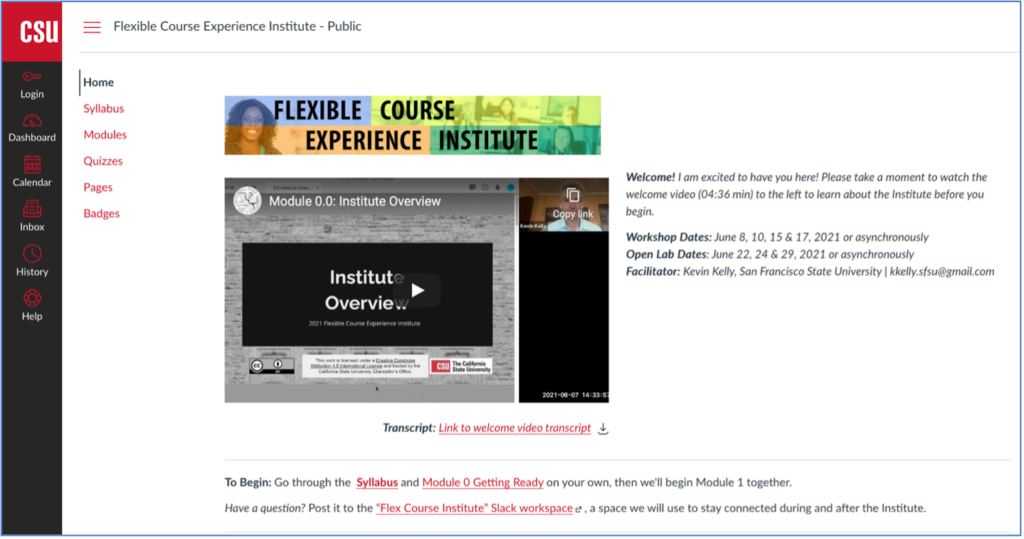
Here are a few other relevant details about the institute:
- Each workshop is contained within a Canvas module.
- Each workshop begins with an overview and a “Check in With Yourself” survey that you can use to identify strength areas (strategies you already use) and growth areas (strategies you want to explore).
- Each workshop contains three micro-lessons that follow the same format—a 10-15 minute lecture followed by a 15-minute activity designed to help you make some part of your course experience more flexible.
- During each workshop, we stopped and restarted the Zoom recording at the end of each micro-lesson, so you and other asynchronous participants can jump directly to the 30-minute chunk you want to see. No one needs to scroll through a 90-minute Zoom recording, right?
- Each workshop ends with a Take Action activity where participants identify at least one strategy they want to use to make their course more flexible.
- Each workshop includes a Keep Learning page with links to additional resources for further exploration.
I hope that you’ll take the opportunity to explore flexible courses and share your own strategies and questions in the comments below.
This article was originally published on the California Acceleration Project (CAP) blog.
One of the most significant factors correlated with student persistence, success, and learning in online courses is the relationship between the instructor and students (CCCCO Distance Education Report). An instructor’s empathy, care, and compassion distinguish the quality of those relationships.
This four-part blog series focuses on humanizing online teaching and learning. Michelle Pacansky-Brock defines humanizing as “a student-centered mindset that involves recognizing and supporting the non-cognitive components of learning. In a humanized course, faculty intentionally cultivate an inclusive learning environment that fosters psychological safety and trust and forms connections that grow into relationships and a community.” My first article was about humanizing your online course with Flipgrid. The second article was titled “Beyond Discussion Forums: Asynchronous Student-Student Interaction Online”, and the third was ”Beyond Lectures: Synchronous Student-to-Student Interaction”. The other side of the humanizing coin is a warm instructor presence that imparts empathy and awareness. In a recent article, “Humanizing Online Teaching to Equitize Higher Education,” Michelle Pacansky-Brock, Michael Smedshammer, and Kim Vincent-Layton highlight, “Instructor-student relationships lie at the heart of humanizing, serving as the connective tissue between students, engagement, and rigor.”
Humanizing And Equity
For minoritized students, having an authentically caring instructor-student relationship is foundational to their learning and success. Dr. Luke Wood, in his 2018 Online Teaching Conference keynote entitled “Reaching Underserved Students through Culturally Responsive Teaching and Learning in the Online Environment,” emphasizes the equity-minded practices of being “relational” by forming relationships with your students and being “intrusive” by reaching out when they need our support. Zaretta Hammond, author of the book Culturally Responsive Teaching and the Brain, encourages us to be a “warm demander” by explicitly focusing on building rapport and trust while still holding high expectations of our students. In Fabiola Torres’s “Practicing Radical Love: Breaking Down Instructor-Student Hierarchies” presentation for the @ONE Humanizing Challenge, she illuminates students’ needs for “care, affection, recognition, respect, commitment, and trust.” Meeting these needs is even more essential for underserved, marginalized students.
A Warm Welcome Package
Your opportunities to greet students at the “door” and make a positive first impression are in your welcome email before the course begins, in your welcome video, and in your syllabus. Your warm, caring, and inviting language and tone are vital here, along with your facial expressions and emotion conveyed in your welcome video. Flower Darby, author of Small Teaching Online: Applying Learning Science in Online Classes, illustrates at her 2019 Online Teaching Conference keynote “Answering the Call: New Motivation for Online Teaching Excellence” that students feel from the start, “I don’t care how much you know until I know how much you care.” Establishing trust from the beginning is paramount.
Welcome Video
Short videos are a powerful way to make personal connections with your students. Imperfect is perfect, and there’s no need to go beyond the first take. Students just need to see and hear from you. In a two to five-minute humanized welcome video, you should introduce yourself personally, share your enthusiasm for teaching the course, and explain how to be successful in it. It’s a salient technique for initiating a personal connection with your students and making them feel welcome in the course. Below are two examples of my welcome videos where I instill a culture of care and personal warmth.
The @ONE Humanizing Challenge offers four options for creating videos depending on your comfort level and preference, including the Clips app, Zoom, Adobe Spark Video, and Screencast-O-Matic. After recording and captioning your welcome video, I invite you to share it with the CAP community and comment with feedback on each other’s videos.
For more wonderful video production ideas, I recommend Karen Costa’s recently-published book, 99 Tips for Creating Simple and Sustainable Educational Videos: A Guide for Online Teachers and Flipped Classes. If you’re feeling anxious about creating videos, view this two-minute “Maritez’s Video Production Journey” video.
Syllabus and Course Policies
While your contact information and quick response times are fundamental to your syllabus, even more so is the language itself. In the Center for Urban Education’s webinar “How to Express Care with a Focus on Racial Equity,” Dr. Frank Harris III delineates that the language of the syllabus sets the tone and establishes the relationship between the instructor and students. I encourage you to reevaluate your syllabus and course policies through an equity lens. Do you communicate with a warm, welcoming tone? Does your late work policy give grace to students? Deliver student-centered messages of “I’m here to support you” and “I care about you and your success.” Instead of using rigid and punitive language, aim for caring and compassionate language. For instance:
| Before | After |
| No late work accepted! NO EXCEPTIONS!!! | I understand that life happens sometimes, so I offer a 24-hour grace period on all assignments, no questions asked. If you are unable to meet a deadline, contact me, and let’s work together to create a plan for your success. |
| Failure to submit the first week’s assignments will result in a student being immediately dropped from the course and replaced by a student on the waitlist. | Tip for success: To count as your attendance during the first week and to avoid being dropped, be sure to log into the course and complete the assignments in the orientation module. I will check in on you if you forget to participate. |
Student Surveys and Canvas “Notes”
We can easily identify early on which students may need more of our attention and support by administering a quick student survey during the first week. Surveys can be created using Canvas Quizzes, Google Forms, or other survey tools. I ask my students questions to gauge their feelings about the class and anticipate their needs, for example, “How are you feeling about this online course?” and “What is one thing that can get in the way of your success in this course, and how can I support you?” See Michelle Pacansky-Brock’s sample student information survey for more excellent questions.
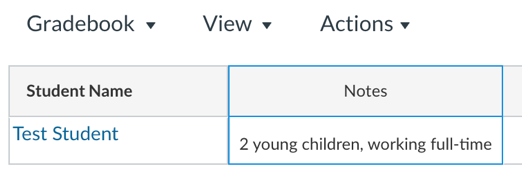
When I review their first-week survey results, I implement the Canvas “Notes” column in the Gradebook to enter details about individual students. Before sending them a message, I check my Notes so I can communicate care into the conversation. For instance, if I note that a student is working a full-time job, has a toddler, and had surgery, I might ask how work is going, how their child is doing, or how their recovery is coming along in my message. I also note the pronunciation of student names and their nicknames for when I have a synchronous meeting with them and when sending them messages.
In addition to administering a student information survey at the start, solicit your students’ anonymous feedback on surveys during and at the end of the semester to improve their experience of the class. You might consider asking them what they enjoy about your class, what suggested changes they would like to see in your course, and then immediately apply their feedback as your course continues.
Maintaining Your Presence
Weekly Video Announcements
Instructor presence can be applied weekly through quick video announcements that express your personal warmth. You might consider including:
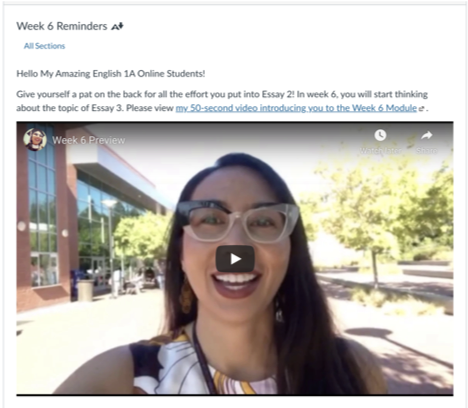
- Praise on recently graded work
- A review of the previous week’s content
- A preview of next week’s content
- A celebration of their accomplishments
- The stickiest/muddiest points from last week
- Highlights from the last discussion or assignment
A student wrote on my anonymous post-course survey, “I will miss her awesome greetings through her Monday morning video announcements!”
Here are two examples of my weekly video announcements:
Feedback/Feedforward
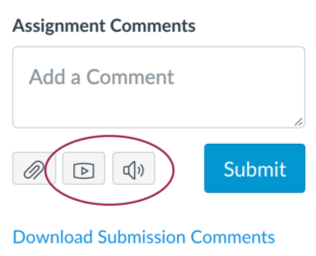
An online instructor’s human presence is also maintained throughout the semester by giving students rich, timely feedback on their work. Engaging in dialogue with students about their progress is critical to the learning process. In the Center for Urban Education’s webinar “Being Aware of Learning Constraints and Opportunities Posed by Online Teaching,” Sim Barhoum demonstrates the “feedforward” approach that focuses on a future they can change, not a past they can’t, for example: “I like that you did x. In the future, can you try y?” and “Can you explain this in a different way?” To save time and to better express your emotion, you might even consider giving students audio or video feedback while in the Canvas SpeedGrader.
Individualized Support
Canvas “Message Students Who”
Another effective humanizing and equity-minded strategy of online instructors is having a keen awareness of their students, paying special attention to when students need support. The Public Policy Institute of California study reveals that the most successful online instructors monitor student engagement and seek out students who seem to be disengaged or struggling. The Canvas Gradebook makes it easier for us to send messages to students who we want to check in with using the “Message Students Who” feature. Once a deadline for a major assignment has passed in my course, I use this feature to nudge students who did not submit it. It can also be used to praise students who are excelling or to provide just-in-time remediation, one of the CAP principles.
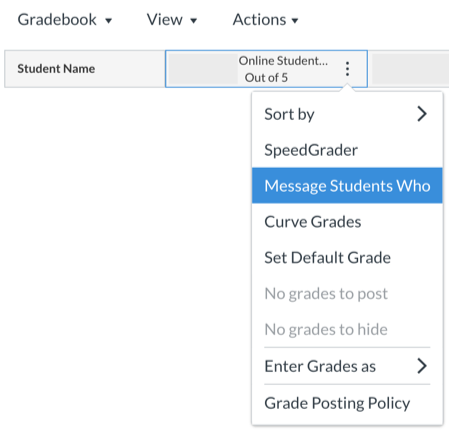
Instead of writing to a student, “You’re missing assignments,” I use the language of care and empathy such as, “I’m checking in. Is everything okay?” Most of the time, I discover that things are not okay and work with the student to get them back on the path to success. At the close of a semester, a Latinx student who was working full-time sent me a letter of appreciation expressing, “I was going through a hard situation a couple weeks before the semester ended and I was thinking of dropping the class and giving up on everything, but thanks to you I decided to keep it. If it hadn't been for the text message you sent me that day and the support you kept giving me, I would have dropped the class and I would have lost my financial aid and other benefits. In other words, you were my hero.”
Personalized Synchronous Meetings
Strong instructor-student relationships are better fostered over synchronous sessions when they are in a more personal one-on-one or small-group format. I encourage you to consider holding scheduled conferences or study sessions with students during your office hours where you could review how a student performed on an assessment, give individualized feedback on a draft, or hold a small group review session before an exam. My schedule always fills up with students signing up for an appointment slot. I even award my students extra credit for attending to reverse the psychology and stigma associated with needing help from the teacher. For ease of schedule management, you could use Calendly, a shared Google Doc, or the Canvas Calendar. Below is an example of how I begin a typical writing conference with a student where I prioritize our relationship by first checking on how the student is doing.
Recap
Without a warm, caring instructor's presence, the online classroom can be a lonely place, and many students who feel isolated may end up dropping out. An online instructor’s care has a significant impact on student success and retention, especially for minoritized students. I hope that my ideas have inspired you to think about how you will create a culture of care and implement your warm human presence. To leverage the potential of humanizing and equity-minded pedagogy in the online environment, we must be intentional in our course design and facilitation to be fully present, convey care and personal warmth, establish trust, and build relationships with students. A Black working mother who I interviewed for my Online Student Voices Inquiry Project disclosed, “We can tell which teachers want us to succeed.” Be that teacher.

Moving completely to distance education in the fall of 2020 challenged faculty and students in many ways. At our local Academic Senate meetings, our Associated Student Government representative would share concerns about student experiences and frustration with inconsistencies in online course delivery. These concerns enriched our conversations and mobilized us to address emergent issues. After hearing from students at Academic Senate and across the state with regard to how they were experiencing online education during the COVID pandemic, it became clear to us that we needed to do a better job of communicating expectations upfront and clarify recommended practices for faculty. We also learned about the technology challenges and/or psychological trauma that many students experience when required to turn on their cameras in their Zoom classes.
The Process
In early October, the Office of Instruction convened a small taskforce consisting of one instructional dean, one student services dean, the registrar, the faculty director of online education, and another faculty member. This group was formed to proactively develop guidance materials for faculty to best address FERPA and student privacy issues in online classes using Zoom.
While we recognized that a policy may require much more faculty buy-in and broader discussion, there was an immediate need to give some guidance to faculty. The small taskforce developed the document, “Guidance for Synchronous Instruction at MiraCosta College to Protect Student Privacy,” in consultation with Academic Senate leadership. The taskforce reviewed examples from other colleges including College of the Canyons. The initial guidance focused on effective practices for synchronous instructional activities, specifically on camera usage, recording, and safeguarding student privacy.
By the end of October, the Chancellor’s Office published their “Legal Opinion 2020-12 Online Class Cameras-On Requirement,” which directed community college districts to adopt policies to address the issue of camera usage in online courses with respect for concerns related to personal educational privacy, access, and equity, and to ensure faculty and students are fully informed.
It became clearer as more discussion happened at Academic Senate that there needed to be a broader policy statement regarding camera usage and when it may be necessary or not. In early spring, I worked closely with the Vice President of Instruction to assemble another taskforce, which included faculty members in disciplines that require camera usage for pedagogical reasons, our faculty director for online education, student services and instructional deans, the registrar, and other faculty leaders. Luckily, we had found a recently adopted example from the Academic Senate at neighboring Palomar College to help facilitate our work.
The Outcome
We reviewed our current practices and discussed streamlining messages and arriving at consensus on when it is appropriate to require the use of a camera. Eventually the group agreed that our fundamental premise is that cameras should be presumptively optional for live synchronous online classes and that cameras may be required in specific course sections to support course curriculum content and objectives, and/or to enhance academic integrity of assessments. We felt that students should have choices and that being upfront and transparent in the class schedule and on the syllabus about what students should expect is critical. Once a draft of the document was developed in March, it was shared in various spaces for feedback. Student leaders present in these spaces and at Academic Senate voiced both positive feedback and suggestions for improvement. This feedback was incorporated into the finalization of the document, “MiraCosta College Commitment to Equitable use of Cameras in Online Instruction and Assessment.” This document represents and clarifies the current practices around camera usage in online courses. It was developed just in time for the summer and fall registration period.
Ultimately, the goals of this document were to make our online synchronous learning environment more equitable, and to codify for students the opportunity to know expectations in advance, in order to make an informed decision early in the enrollment process. The document did not create new practices; however, it made explicit and systematic the messaging and practice across the curriculum.
The process took longer than what I had expected, but through a true collaborative process among various stakeholders, we were able to achieve clarity and consistency for the sake of our students and their success.

This article was originally published on the California Acceleration Project (CAP) blog.
Humanizing And Equity
The theme of this four-part “Notes from the Field” blog series has been humanizing online teaching and learning with an equity-minded lens. Michelle Pacansky-Brock, the highly-acclaimed CVC-OEI Online Teaching and Learning Faculty Mentor, writes, “In humanized online courses, positive instructor-student relationships are prioritized and serve as the connective tissue between students, engagement, and rigor.”
My blog on “Humanizing Your Online Courses with Flipgrid” kicked off the series by exploring ways to use video to humanize online courses and engage students, followed by my second article, “Student-to-Student Interaction Online (Asynchronous).” This article centers on live student engagement using Zoom. Stay tuned for my last article in the series, which will be an examination of instructor-to-student interaction in “Conveying Care Online.”
Not Just Lectures
The COVID-19 pandemic has triggered an unprecedented surge in synchronous online teaching and learning. Synchronous instruction is popular because it provides the opportunity for students to interact with each other and with their instructor in real time, much as they might in an on-campus class. Because it most closely mirrors in-person teaching, many instructors who did not have much (or any) online teaching experience prior to the pandemic have gravitated toward this style of teaching, and most instructors now know how to share their screen and deliver a lecture.
But Zoom also provides many tools to go beyond lecturing and foster students’ higher order thinking skills, something that is critical to equity-minded teaching.
“School practices that emphasize lecture and rote memorization are part of what Martin Haberman calls a ‘pedagogy of poverty’ that sets students up...with outdated skills and shallow knowledge,” writes Zaretta Hammond in Culturally Responsive Teaching and the Brain. “They are able to regurgitate facts and concepts but have difficulty applying this knowledge in new and practical ways. To be able to direct their own lives and define success for themselves, they must be able to think critically and creatively” (14).
My goal in this blog is to share a sample lesson plan and other tips that promote interaction, engagement, and deeper learning when using Zoom. Following a consistent lesson routine helps students feel more comfortable and open to learning since they can anticipate how the class meetings will progress.
Many of the following strategies require that you enable these Zoom settings and prepare materials in advance, so plan ahead.
Getting Started
Early in the semester, set the tone for interaction by establishing your Zoom culture and norms. Invite your students to co-create a few community agreements for participation and reinforce them throughout the semester. These might include norming expectations for unmuting mics and speaking during class, as well as non-verbal interactions. Carving out the time to do this will pay off in better engagement over the semester.
Class norms should not include requiring students to turn on their cameras. These requirements counter the humanizing principles of having empathy as well as respecting and trusting students. They also violate legal guidance from the California Community Colleges Chancellor’s Office, which states, “Districts should adopt policies strictly limiting or prohibiting faculty from instituting cameras-on requirements in order to protect against violations of student privacy...and ensure compliance with FERPA, California’s student privacy law, and federal disability laws” (7).
It can be challenging for instructors to teach a class to black boxes on Zoom, so consider showing students how to use a virtual background and how to add their profile photo to connect names with faces. Instead of mandating cameras on, offer students an invitation like, “I invite you to turn on your video if you can. If not, I understand.”
Sample Lesson Plan
Check-Ins
To encourage community, have everyone check-in at the beginning of your Zoom meetings. This communicates to your students that your class will not be a passive experience similar to watching TV but instead, an engaging learning session requiring their attention and active participation.
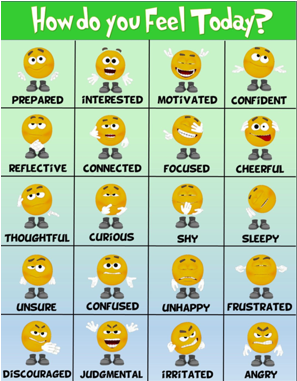
Check-ins or warm-ups can be as simple as asking students to type a word, number, or emoji in the chat to describe how they are doing today or how they are feeling about an upcoming essay or exam.
If students are not participating in the check-in, try a more structured and easy way for them to interact. For example, you might consider screensharing emojis or animal faces that are numbered to prompt them to share which image corresponds with their current mood.
Providing an opportunity for more creative student contributions can also boost participation. For instance, ask students to find and paste a meme or gif into Google Slides or Google Jamboards to describe how they are doing today, such as in Esther Park’s Jamboard check-in template. After students get used to this routine, they tend to come prepared with fun contributions.
Short Direct Instruction with Interaction
Direct instruction, a.k.a. “lecture,” is useful if your goal is to teach a new concept or to demonstrate a skill, but keep it short. Studies show that the average attention span for video conferencing is only around 10 minutes. I only “teach” the most challenging or confusing concepts through a short presentation, and I chunk this instruction with student participation every few minutes to keep them focused and check for understanding.
Here are some tools besides chat that you can use to make direct instruction interactive:
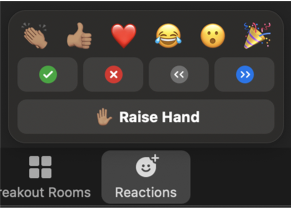
- When introducing a new topic, activate students’ background knowledge with a quick poll using the Zoom poll feature or Socrative.
- To keep students engaged and to let them know that you care about their affective experience of the lesson, elicit feedback using Zoom reactions and nonverbal feedback. For example, I might ask a yes or no question and ask students to give me a thumbs-up emoji if they agree or to raise their hand if they understand.
- To check for understanding and to reinforce concepts, you can use a Zoom poll or create fun quizzes and trivia games using tools like Kahoot and Flippity.
- To invite students’ perspectives on a topic, you can have them annotate a Google Slide, such as in this Four Corners activity, where students read several debatable statements and mark the box that best represents their opinion for each. You can then ask students from different corners to unmute themselves and share their reasoning.
Student-to-Student Interaction in Breakout Rooms
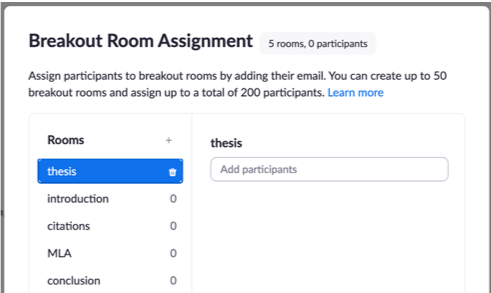
After direct instruction, provide an opportunity for students to practice higher order thinking in breakout rooms. Give them a task that warrants group interaction and deeper thinking by requiring them to apply, analyze, evaluate or create using what they learned. If students have a well-defined deliverable, they are more likely to engage and collaborate. For example, the task might require students to add to a Padlet, contribute to shared Google Slides, Docs, or Jamboards, or you could use the annotation tools in Zoom and ask students to collaboratively mark-up texts or solve problems.
You will need to adjust your Zoom settings for breakout room activities. John Montgomery’s Zoom blog “All You Need to Know About Using Zoom Breakout Rooms” explains your options and will help you think through the nuances of how you want to structure the interaction. Will you pre-assign groups or allow students to self-select into a group? Will the group work be timed? Will students be allowed to rejoin the whole class session at any time?
For example, before the Zoom meeting I set-up breakout rooms that correspond to skills required on an upcoming essay assignment: thesis, introduction, citations, MLA, and conclusion. I ask students to choose their room based on what they need to work on. On a shared Google Jamboard are links to my class resources on each topic. When in the breakout room, they can access and discuss these resources and add their questions and ideas to Jamboard’s collaborative digital whiteboard using images, sticky notes, text, or drawings. For some fantastic activities and templates using Jamboard, visit Matt Miller’s Google Jamboard resources.
When students work in groups, sometimes they may be hesitant to engage in the task or to participate. Here are some strategies that may help:
- Start every group interaction with a quick round of introductions, similar to a check-in, where students share their name and something about themselves. This can reduce fear and build rapport so that students are more comfortable working together.
- Establish a norm that helps the group get oriented to the task. For example, read the task, paraphrase the task in everyday terms, etc.
- Show students the “Ask for Help” button in the Zoom toolbar that appears only while in a breakout room. You will be notified that a group needs your help and be prompted to join their room. To encourage group interaction, you may want to establish a norm that the question needs to be discussed in the group first before the group activates the “Ask for Help” button.
- Keep your eye on the deliverables and rotate through the rooms. This allows you to monitor their progress and understanding and helps keep students focused. Since I can view each room’s shared deliverable, I prioritize joining any rooms that are slow to start or who could otherwise use my assistance.
- Assign roles. To hold students more accountable, I assign roles for each student, such as recorder, screensharer, reporter, and timekeeper. Then when I enter the room, I can ask questions of students in each role.

Closure
After group work in breakout rooms, reconvene the class in the main room to bring closure to the lesson. Depending on the lesson and your goals, this time might be spent sharing and discussing the deliverables they created, assessing learning, or gathering information about your students’ experience that you can use to plan the next lesson. Perhaps more important, when you elicit feedback and use it, students feel that you care about them and their learning, and this is at the heart of humanizing the online classroom and equity-minded teaching.
Here are some ideas and tools for closing the lesson:
- Ask students to unmute their mics, share their screens, and present their deliverables. If you assigned a reporter to each breakout room, they could share highlights from what they discussed in their room with the whole class.
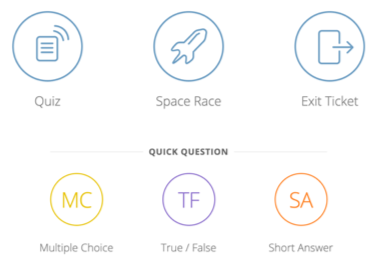
- Check for understanding by administering a quick formative assessment using the multiple choice or single choice items allowed in Zoom Poll. Share anonymous responses with the class for discussion.
- Collect information about students’ confidence with the concept or skill covered in the lesson using a rating system like Esther Park’s Google Slide template.
- Use exit tickets or brief quizzes to ask students to respond to what they learned that day. This can be done through a simple Google form or through Socrative, which instantly populates the results in a convenient spreadsheet. Some example open-ended questions I use:
- What was the most important thing you learned today?
- What was the “muddiest” or most confusing point still remaining at the conclusion of today’s class?
- Do you have any suggestions for what we should do differently?
Cautionary Notes
- Making Zoom class time optional may undercut learning. Some instructors are choosing to make their Zoom class meetings optional and making the recordings available to those who are unable to attend. Keep in mind that passively viewing long video recordings can be disengaging and is not equivalent to being present and actively participating in real-time. If the goal of synchronous sessions is to create interactive learning experiences, that cannot be experienced through a recording. If you are using Zoom breakout rooms, those rooms are not captured in the recordings, so students accessing your content solely by viewing the recordings are excluded from those conversations. You’ll need to create alternative ways to ensure that those students still have equitable access to mastering the content.
- Zoom is a high-bandwidth task. Synchronous instruction based on Zoom can contribute to a digital divide that the COVID-19 pandemic has already exacerbated among BIPOC students (Black, Indigenous, People of Color). Black and Indigenous students are more than twice as likely to report not having a functional laptop as White students, and “19% of Black students, 20% of Latinx students, and 26% of Indigenous students indicated the challenge of not having internet access, compared to only 11% of White students” (CCCCO’s Statewide COVID-19 Impact Surveys of Student and Employees 11). When teaching synchronously, be sure to survey students about their access to necessary technology, including laptops and high-speed internet, then connect them with college-provided resources as needed. (If your college is not currently providing these resources, work with other faculty, administrators, and staff to begin doing so).
Conclusion
Synchronous online instruction allows valuable class time with our students, and we owe it to them to use this time in the best service of their learning. Zoom contains simple but powerful tools for humanizing online education, developing students' critical thinking and creativity, and fostering community. Fabiola Torres, Glendale Community College Ethnic Studies Professor, explains that “through care, affection, recognition, respect, commitment, and trust, humanizing online education becomes a practice of radical love.”
If you're looking to level up your synchronous online teaching skills, register for the 2-week online course offered by CVC/@ONE, Introduction to Live Online Teaching & Learning!
Welcome to the Points Marketplace
| Task | Value | Time | Conclusion |
|---|---|---|---|
| Complete the Assessment Worksheet | + 10 pts | - 3 hours | ▲ |
| Read Grading for Equity | + 20 pts | - 2 days | ▼ |
| Late work | - 10% /day | + X days | ▲ |
| Find a sample rubric | + 5 pts EC | - 5 min | ▲ |
At the end of the semester, each student receives a single letter grade that summarizes how well they learned the content of our course. But, how much of that grade is really a measure of what they learned? How much of a student’s final grade is based on:
How complicated is their life?
Students with many responsibilities (such as unpredictable work schedules or family members who face emergencies) may lose points on late work because they need to choose between helping their child and helping themselves.
One of the concerns faculty have with removing late penalties is that students will abuse this allowance. This was not my experience when I went from very harsh late penalties to none at all. Most students still completed the assignments on time. The main difference I saw was that students who would likely have dropped due to missing early assignments stayed in the class and learned the content.
How much extra time do they have?
When we give students extra points for activities that are time intensive (such as watching a movie and connecting it to course content), we may be grading students on how much free time they have. Faculty often use extra credit as a “slush fund” to make up for points deducted due to things like late work. If we remove those penalties, students can focus on the learning rather than “making up points”.
Do they know the “hidden curriculum” of academia?
When we make assumptions about what a “good” essay looks like or the test-taking skills students bring, we may be measuring which high school students attended rather than their knowledge of our content.

When we have harsh late policies but bend them for students who request an extension, we are actually measuring a student’s willingness to tell us about their challenges, their feelings of being worthy of special treatment, and their cultural background. It’s much more fair to let all students know up front that late work is acceptable. That is a move towards a more equitable learning environment.
A concern I often hear about removing late penalties is that this makes the class less fair to students who complete the work on time. Treating all students equally can seem like the fairest approach but, in actuality, we are creating a playing field that benefits students who come to our class from backgrounds most similar to our own. Clearly outlining the flexibility in our course policies helps us build a course that responds to individual student needs. This lets us and the students focus on the course content rather than navigating course logistics.
Let’s revisit the points marketplace
In the table above, a student may choose to lose points for a late assignment over losing hours at work. After all, they can make up these points with extra credit but can’t make up the lost wages. And, a student with limited time may skip the reading. This reading takes the most time and results in the fewest points/hour. Unfortunately, this is also the single most useful item on the list. I highly encourage you to read Grading for Equity (for zero points)! It brings a fascinating perspective that completely changed the way I look at grading.
Disinvestment from the points marketplace
Instead, what if we focus our grading directly on what we want students to learn and remove all the confounding variables that add inaccuracies to our measures.
For example: I want to measure a student’s understanding of the respiratory system. I could ask students to write an essay - but this measures writing skill AND their understanding of the respiratory system. The writing skills are a confounding variable because they mask the true measure of a student’s understanding of the respiratory system. Similarly, using a timed multiple choice test adds the confounding variables of how fast students recall information and their ability to parse multiple choice test questions.
An alternative approach to this assignment is to tell students exactly what you intend to measure and let them choose how best to demonstrate this knowledge. For example:
Trace the movement of a molecule of oxygen from outside the body until it reaches a red blood cell. This may be easiest to answer using a numbered list, but you are welcomed to approach this however works best for you.
- Include the following structures: alveoli, bronchus, bronchioles, epiglottis, larynx, pharynx, trachea. Briefly describe each of these structures.
- Also include the terms: diffusion, oxygen and carbon dioxide.
The assignments in my biology class give students options in how they demonstrate their knowledge. Students choose to describe this process using a wide variety of strategies: an essay, labeled diagram, flowchart, video, and many more. I’ve been amazed at all the creative and engaging strategies students find for explaining concepts. Grading becomes fun! (yes, really…) The key to giving students options in how they demonstrate their knowledge is to be clear about what I am assessing and grading. Good rubrics (like the one below) are essential.
| Criterion | Exemplary | Accomplished | Developing |
|---|---|---|---|
| Structures are described correctly | 3 | 2 | 1 |
| Flow of oxygen molecule is accurate described using the listed structures | 3 | 2 | 1 |
| Diffusion, oxygen, and carbon dioxide are accurately identified | 3 | 2 | 1 |
Compare this rubric with the table at the very beginning of this article. What are students asked to focus on? Which gives us more accurate information about what a student is learning? I invite you to share your thoughts and equitable grading approaches in a comment below!

This article first appeared on the California Acceleration Project blog.
When I asked my students for anonymous feedback at the end of my online course, they responded, “I loved being able to still have interaction with my classmates. I didn’t think I would really get that interaction in an online class so that was definitely a bonus for me,” and “I liked how the professor was able to keep us all connected with each other and made it feel as if we were in an actual classroom even though we were in the comfort of our home.”
Students taking online courses that are intentionally designed with opportunities for asynchronous student-to-student communication and collaboration reap the rewards of not only the cognitive benefits of sharing ideas with peers, but also the socio-emotional benefits of being a member of a learning community. By cultivating engaging interactions and interconnections among students, we create a quality humanized learning environment where students, especially BIPOC (Black, Indigenous, and People of Color) students, thrive.
Humanizing & Equity
This is the third blog in a series within the theme of humanizing online teaching and learning with an equity-minded lens. Michelle Pacansky-Brock’s transformative work on humanizing delineates how this practice “leverages learning science and culturally responsive teaching to create an inclusive, equitable online class climate for today's diverse students.” View the latest Humanizing Visual Guide on “How and Why to Humanize Your Online Class.”
Implementing equity-minded and culturally responsive teaching practices to establish trust, make connections, and foster community is critical to serving minoritized students. Geneva Gay offers suggestions for improving the education of marginalized BIPOC students in her book Culturally Responsive Teaching: Theory, Research, and Practice as she illuminates, “Cooperation, community, and connectedness are central features of culturally responsive teaching. Mutual aid, interdependence, and reciprocity as criteria for guiding behavior replace the individualism and competitiveness that are so much a part of conventional classrooms. The goal is for all students to be winners, rather than some winning and others losing” (43-44). Author of the book Teaching to Transgress: Education as the Practice of Freedom, bell hooks expresses, “As a classroom community, our capacity to generate excitement is deeply affected by our interest in one another, in hearing one another’s voices, in recognizing one another’s presence.” This is true for producing equitable outcomes and completion in the online classroom, as well. Culturally responsive online courses provide BIPOC students with a sense of community and belonging because they are not working in isolation--but in close collaboration with their peers.
In the online classroom, instructors need to be intentional in their course design to not only have a caring instructor presence, but to also provide multiple learning opportunities for students to cultivate trust, build community, and develop relationships with each other. For more on cultivating trust, view the “Sending Cues of Trust Online” session archive from the spring 2021 @ONE Humanizing Challenge Encore with Michelle Pacansky-Brock, Jennifer Ortiz, and me as your guides.
Why Student-To-Student Interaction?
Not only is course design with student interaction an equity-minded and a humanizing practice, but it is also required for compliance with both the California Education Code Title V regulations on Regular Effective Contact (§ 55204. Instructor Contact) and the federal Higher Education Opportunity Act.
Research reinforces how vital a sense of belonging, the establishment of relationships, and collaborative group work are to online student learning, retention, and success. The 2017 CCC Chancellor’s Office Distance Education Report highlights, “A sense of belonging to a learning community is an important factor for distance education students” (33) and “students who are comfortable establishing relationships in an online environment tend to persist at higher rates” (52). A 2015 Public Policy Institute of California report delineates that “a student’s perceived learning is correlated with how much of a sense of social presence is created in an online course. When the course structure allows students to develop strong working groups, they perceive the course to be ‘congenial,’ see themselves as a community, and perform better” (11-12). One of the four factors most directly correlated with California community college student success in online courses is regular effective contact (2015 Public Policy Institute of California).
Furthermore, interaction among students is an important component of the CVC-OEI Online Course Design Rubric (Section B4 and B5 on Interaction: Student-to-Student Contact) and the Peralta Equity Rubric (Section E8: Connection and Belonging).
Not Just Discussion Forums
For years, online courses have depended on whole-class discussion forums to encourage interaction among students. Imagine being a full-time online student whose courses all require you to post and reply to discussion forums week after week. It becomes disengaging as students suffer from discussion forum fatigue.
My experiences participating in and assigning formal, contrived discussion forums have not been effective at building a strong online classroom community. It’s easy for students to get lost in whole-class discussions because they can be lengthy, clunky, and overwhelming with multiple conversations going on at once. In fact, two students speaking on a panel at the Online Teaching Conference 2019 session on “Online Student Community: What Do Students Need from Us?” shared that they loathe weekly whole-class discussions where they are required to post, reply to two peers, and meet the minimum word count. One student honestly disclosed, “Personally, I hate discussions. Hate them.” She explains the reasons for her aversion are that they are forced, that they are not organic, and that connections don’t form out of them.
I encourage online faculty to consider designing student-to-student interaction activities such as those described below that utilize asynchronous, low-bandwidth methods, which offer online students with unstable internet connections and with work or family responsibilities the flexibility they need to succeed in college. For additional examples by California community college faculty, view the @ONE Student-Student Interactions Guide.
Student-To-Student Interaction In Practice
Low-Stakes Collaborative Practice
Low-stakes, formative practice activities are an excellent vehicle for heightening student engagement and retention. These checkpoints of student learning can be conducted online in the spirit of collaboration.
Group Discussions
To better foster community, consider placing your students into small groups to discuss your content instead of assigning whole-class discussions. When you break your class into diverse smaller groups to have more intimate discourse about your course content, there is a boost in meaningful student-to-student interaction. Students experience both a deeper engagement in the content and a greater chance of forming connections by focusing on the replies of 3 to 5 students instead of 30 or 40, especially when the groups are sustained over several weeks. Students in my online classes have expressed their appreciation of the small group discussions over a month as they discuss the book we are reading together in “book clubs.” View the first twenty minutes of this video of my CVC-OEI Can•Innovate presentation on “Group Discussions for Increasing Interaction, Engagement, and Equity” for why I choose group discussions over whole-class discussions and how to set them up on Canvas.
Peer Review

Engaging students in giving one another feedback on their work or work-in-progress is another effective method of strengthening student-to-student interaction. Community is built as students support each other’s success and learning concepts are reinforced while engaging in a collaborative peer review process. Evaluating others’ work is a low-stakes, collaborative practice opportunity to reinforce the learning of your course concepts. I find it helpful to give students questions to respond to that evaluate specific criteria as they conduct their reviews. Canvas has a built-in peer review assignments tool, and it can be achieved in peer review pairs or small groups. For instance, students can give and receive art critiques or feedback on their problem-solving, presentations, and writing.
Social Annotation of Readings
Culturally responsive teaching draws from and then builds upon all that our students bring to the classroom, and Hypothesis provides a space for students to share it in the margins of texts while they read. For example, for low-stakes collaborative practice of strategic reading skills and metacognition, I ask my students to annotate parts of an article where they are making connections, asking questions, inferring, synthesizing, visualizing, and determining importance. This validates their cultures and language and capitalizes on it by using their background knowledge as a window to learning new content.

If you assign readings in your courses, Hypothesis allows for social annotation and replies for class conversations to unfold in the margins of PDFs and websites. In the recording of “Liquid Margins 18: Social Annotation in Community College: A California Case Study,” Kat King, Brandon Harrison, and I highlight how weaving in social annotation as a teaching practice has significantly increased student engagement, critical thinking, and learning outcomes.
Student-Created Videos

Text-based assessments come to life through video and audio with Flipgrid and Canvas Studio. Both of these humanizing tools can be implemented for both low-stakes practice and higher-stakes student presentations, debates, or speeches. A conversation unfolds as students interact through recorded videos and video, audio, or text replies to one another. For more on Flipgrid, see my previous article titled “Humanizing Your Online Courses with Flipgrid”.
Higher-Stakes Collaborative Summative Assessments
If you assign a wonderful group project or presentation in your on-campus class, then retain it for your online version. You might consider having groups collaborate on creating real-world, authentic infographics, pamphlets, slideshows, webpages, or videos on shared Google Slides, PowerPoint Presentations, or Adobe Spark posts, videos, and pages. For instance, math squads could design webpages on statistics of racial disparities in their community, groups of biology students could create pamphlets that might be found in a doctor’s office on diseases affecting marginalized populations, or ESL teams could record videos presenting different grammar concepts. Groups could then share their final products with the entire class, perhaps on a Padlet, which is a straightforward digital bulletin board that allows students to share digital content and leave feedback or comments to one another.
Canvas makes it simple to turn an individual assignment into a group assignment. For more on online group work and helpful resources, view the “Byte-Sized Canvas” video by Helen Graves, an @ONE Instructional Designer, on “Why Group Assignments Are Worth Your Attention.”
Some may cringe at the idea of group work. I’ve found that the more clearly structured and scaffolded the projects are, the better the experience for every group. Monitoring the groups helps ensure their success and gives me better insight into their group dynamics, so I build in regular check-ins, ask them to self-reflect, and evaluate their peers at the end. Providing models of exemplary work is a helpful resource for students to clearly understand what they are being asked to produce. I find it important to allow ample time for online students with busy schedules to successfully collaborate than I do when teaching on-campus courses. In Vanderbilt University’s guide entitled “Group Work: Using Cooperative Learning Groups Effectively,” Cynthia J. Brame and Rachel Biel offer helpful recommendations for structuring group work and making it effective that are transferable to the online classroom.
Informal Student-Initiated Contact
In addition to course-related collaborations and interactions, high-quality online courses provide spaces for unstructured student-initiated social contact with their peers. I’ve attempted implementing Canvas Discussions and Flipgrid for this purpose, but I have experienced the most success with Pronto.

Pronto is the social space for students to connect more organically as they communicate through modalities they are already familiar with: text chats, GIFs, emojis, and live video. In my whole-class thread, students are asking questions, making clarifications, troubleshooting technology, and supporting one another on assignments. With Pronto, students have the ability to form their own groups, such as study groups or project teams, and it makes private or direct text exchanges possible between study buddies or friends.
Conclusion
Connections and relationships do not form as organically online as they do on campus. However, the formation of strong relationships between students and a robust classroom community is possible to achieve from a distance. Incorporating both formal and informal student-to-student interaction opportunities to establish trust and foster a social presence online is a humanizing, equity-minded, and culturally responsive pedagogical practice that addresses educational inequities and increases minoritized students’ success.
How will you design engaging asynchronous student-to-student interaction in your online courses?
Humanizing is a teaching approach that prioritizes instructor-student relationships and applies culturally responsive pedagogy to online courses. Humanizing has been a popular topic in recent years — but since the pandemic has brought about levels of isolation never before experienced, the subject has risen to the forefront. While we learn the HOW of humanizing, it is also important to address the underlying question of WHY it works.
I believe that understanding this WHY will help educators to make more informed choices about course design, content delivery, assessments, class activities, and much more. This video explains the role of the limbic system in processing new information and experiences, as well as some steps educators can take to reduce fear and anxiety in their students in order to foster a welcoming, safe space for student learning and growth.
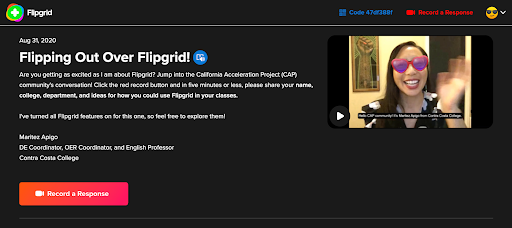
This article was originally published on the California Acceleration Project (CAP) blog.
Humanizing And Equity
Students’ learning ignites when they trust their instructor and form relationships with their classmates. Michelle Pacansky-Brock is helping faculty nationwide to humanize their online teaching. She defines humanizing as “a student-centered mindset that involves recognizing and supporting the non-cognitive components of learning. In a humanized course, faculty intentionally cultivate an inclusive learning environment that fosters psychological safety and trust and forms connections that grow into relationships and a community.” She illustrates that the two key ingredients for humanizing are instructor presence and social presence.
Strengthening the sense of community and humanizing online learning are inclusive, equity-minded practices. Dr. Luke Wood, known for his “Black Minds Matter” webinar series, delivered a keynote entitled “Reaching Underserved Students through Culturally Responsive Teaching and Learning in the Online Environment” at the 2018 Online Teaching Conference. Wood emphasizes the need to create a “community-centric” environment where students have opportunities to share their perspectives, stories, and reflections.
This point is echoed by Zaretta Hammond, author of the book Culturally Responsive Teaching and the Brain, who emphasizes creating “a community of learners” by building on students’ values of collaboration and connection to create intellectual safety and reduce stereotype threat.
Flipgrid supports a strong sense of community and social presence as students interact with each other and as instructors reply to students beyond text alone. Students are speaking and listening to each other, with audio and video enhancing their online exchanges. Tone, facial expressions, accents, and the sound of each other’s voices humanize each person and the whole online environment.
I’ve witnessed quiet and reserved students absolutely shine on Flipgrid because it gives every student a voice. In an on-campus or synchronous setting, you are constrained to the time allotted for your class meeting, so not every student is allowed the opportunity to speak. That is not the case with Flipgrid; students are at the center and have equal opportunities to contribute.
Student Feedback
Students reported on my anonymous feedback survey how much they love Flipgrid:
- “In this course, I like the discussions that we’ve been having on Flipgrid. Flipgrid is really easy to learn and a fun place to interact with other classmates.”
- “One thing that at first I didn't like because it brought me out of my comfort zone was the Flipgrid assignments but now I see them as valuable and think it’s a great part of this class.”
- “Initially, I thought that I wouldn't like Flipgrid because the idea of posting videos of myself online was not appealing at all. But, after doing our first assignment and receiving comments on my videos, I actually like Flipgrid because I feel that I am actually in this class interacting with my fellow English 1A classmates.
Flipgrid Features
Instructors create prompts on Flipgrid (called “topics”), and students post their video responses to the forum for that topic (called a “grid”). Flipgrid enables faculty to:
- Seamlessly embed video assignments into Canvas for easy student access
- Use Canvas Speedgrader to assess video assignments
- Automatically create and edit closed-captioning for accessibility (Be sure to enable this feature!)
- Enable video moderation for private conversations or testing
- Set time limits for students’ video recordings from 15 seconds to 10 minutes
See the faculty and student resources below for how-to videos. I encourage you to give Flipgrid a try from the students’ perspective. Go to our CAP Community Flipgrid, record a video response to the prompt, and reply to colleagues. (Note that this Flipgrid is not integrated into Canvas.)
Maritez’s Examples
I use Flipgrid to foster a high challenge, high support pedagogy in line with the CAP principles. It is easy to build fun Flipgrid assignments that prompt low-stakes collaborative practice on meaningful and challenging tasks. Just-in-time remediation takes care of itself using Flipgrid when students and the instructor reply to each other with friendly suggestions and support. The result is ultimately a community of learners with affective benefits that encourage effort and persistence.
Consider replacing some of your Canvas Discussions with Flipgrids to prevent discussion fatigue. I have heard of colleagues who alternate between Canvas Discussions and Flipgrids each week. I enjoy sprinkling Flipgrids throughout the semester.
- Introductions: During the first week, students in my English courses meet each other through video interactions on our first Flipgrid. They introduce themselves and then reply to each other with greetings, commonalities, and questions.
- Microaggressions: After my students read articles from multiple perspectives on microaggressions, they share a situation when they experienced (or witnessed) a microaggression, the implied meanings, and their reactions. I record an example video for my students to use as a model, which Flipgrid allows you to pin at the top. You might also consider pinning stellar students’ videos as models to highlight. Students and I reply to each other and a fruitful discussion ensues.
- Research and Writing Challenges: When my students are knee-deep in their research projects, they share their specific challenges with conducting research and with academic writing, such as finding effective evidence, searching the library databases, and MLA style. Students reply to each other by offering friendly solutions, suggestions, support, and encouragement.
- Student Lounge: To support student-initiated contact with other students, I create a Student Lounge Flipgrid as an ongoing space for students to chat about non-course related topics. Flipgrid can be utilized for your course Q&A where students can reach out with questions. I’ve also applied it at the end of the course for us to say our goodbyes.
For The Camera-Shy
Students may be hesitant to record videos of themselves or show their faces on camera for various reasons related to their cultural background or comfort level. It’s important to practice inclusivity in our teaching and provide alternatives for students to still participate in our courses.
Show your students the features in Flipgrid such as using the rear-facing camera (on any device that has one), pixelating their face with a filter, or inserting a large emoji over it. Similar to screen sharing, the Flipgrid camera is filled with new powerful features including a series of boards - whiteboard, blackboard, graph paper, lined paper, and more - which allow your students to share their voice either with or without their face being on camera. They can still successfully participate in Flipgrids by contributing their audio recording with alternative visuals.
Flipgrid “Topic” Ideas
Flipgrid provides many opportunities to make learning authentic and communal by asking students to actively process course material, apply concepts to their lives, and collaborate with each other.
All Disciplines
- Introductions: Having students introduce themselves or do icebreakers at the beginning of a semester is a simple way for students to first learn Flipgrid.
- Discussions: Asking students to respond to an open-ended prompt and then reply to their peers is a great opportunity for low-stakes, collaborative practice with course concepts.
- Think alouds: A technique from Reading Apprenticeship, this activity asks students to read a passage and describe what is going through their mind, building metacognitive understanding of reading processes and strategies.
- Presentations: Students share slides and deliver speeches on course concepts.
- Storytelling: Students share experiences from their lives that connect to the class topic.
- Debates: Students practice argumentation, with half the class assigned to one side and half to the other side.
- Muddiest points: Students share the most challenging or confusing part of a lesson/unit and receive clarification from peers.
English
- Reading groups:Students discuss assigned readings in small groups, supporting both reading comprehension and critical thinking. (Set up a separate Flipgrid for each group.)
- Golden lines: Another Reading Apprenticeship technique asks students to share important quotes from a text, explain why they were important, and reply to peers’ golden lines.
- Summaries of found content: Students find their own reading, film, poem, etc. related to the course topic and provide a summary to the class.
- Socratic seminars: Students discuss spoken responses to an essay prompt before writing.
- Peer review or critiques: Students share a draft (or part of a draft) of their work and receive feedback from their classmates.
ESL
- Vocabulary charades: Students act out a vocabulary word and peers reply with their answers. (You can also have students teach the class new words and peers reply with their use of the word in a sentence.)
- Interviews: Students work in pairs to practice question formation and responses.
- Clap the word: Students practice pronunciation by clapping the syllables of a word with the stress on the correct syllable.
- Grammar lessons: Students deliver a presentation on a grammar point to the class or tell a story from their lives using the targeted verb tenses.
- Reading and writing activities: Students discuss their personal responses to a reading, enabling them to talk through ideas in preparation for a formal writing assignment.
- More ESL ideas on the Flipgrid site and under “English” above.
Math
- Number talks: Students deepen their learning by explaining their math reasoning and problem-solving processes and seeing how other students approached a problem.
- Tutorials: Students create mini-lessons on different math skills using the screen record, whiteboard, or graph paper features.
- Challenges: Students create their own math problems for classmates to complete, then reveal the correct answer in a later reply.
- Real-world math: Students share math experiences from their lives, helping them understand that math is all around us.
I hope that my ideas have inspired you to think about the kinds of discussions and interactions you would want your students to engage in Flipgrid. If you intend to create an online course with a strong social presence and community, Flipgrid is a powerful tool for applying student-centered, equity-minded pedagogy.
Faculty Resources
- Integrating Flipgrid into Canvas
- VIDEO: Edit Captions on Flipgrid Videos by Flipgrid
- WEBSITE: Flipgrid Help Center
- WEBSITE: Flipgrid Blog
Student Resources
- VIDEO: Flipgrid Demo: Student View in Canvas Using a Computer by @ONE
- VIDEO: Flipgrid Demo: Student View in Canvas Using a Mobile Device by @ONE

Leaving Exams in 2019
During the summer of 2020, as the pandemic made it obvious we weren’t going back to “normal life” any time soon, my curriculum needed to reflect the massive changes that were happening in our society. Using the traditional STEM assessment style of short answer or multiple choice exams would not function well within this online learning environment. I could continue to give traditional exams, but would they actually be a valid measure of student knowledge? And, more broadly, would these exams serve my students in helping them to develop skills necessary to be successful beyond my class?
Additionally, if I were to continue to use traditional assessments I would need to employ an online proctoring tool. This tool would help me maintain academic integrity, to an extent. However, these proctoring tools have significant implications for student equity. Knowing this, I could not, in good conscience, use one.
In 2019, I made the decision to leave my exams and not use an online proctoring tool. But this left me in a tough spot. How would I measure a student's knowledge without using exams?
Switching Assessment Styles
As an undergraduate STEM student and a STEM instructor, exams are the only type of assessment I have ever known. As I made this change, I began to realize that it would be important to switch to assessments that enabled my students to demonstrate their knowledge and develop new skills that could be used in other classes, as well as in life beyond higher education. With access to an abundance of human knowledge at our fingertips via the internet, the ability to research, synthesize, and communicate ideas is of more value to my students’ future than memorizing all the steps of photosynthesis for an exam. With this shift, I was able to move from assessing rote memorization to critical thinking skills – isn’t that what we all should be striving to do? I was also able to connect abstract concepts to current events or students’ daily lives, making them more meaningful and memorable.
Through this process, I developed a set of projects that draw on the principles of authentic assessments to assess student learning. I provide the basic structure of what needs to be included in the project so I can assess my students’ comprehension of the concepts, but the format of the project is generally open-ended, and multimedia projects are encouraged.
One example is a role-play scenario where students step into the role of interns for a state government committee on health and human safety. Their goal is to brief the state representative for whom they work about the rise of antibiotic resistant bacteria. This project was inspired by the Performance Assessment Resource Bank. In the brief, students must include the following:
- A discussion of what makes bacteria different from other forms of life
- An explanation of how bacteria become resistant to antibiotics, in evolutionary terms
- A description of environmental conditions that select for antibiotic resistant mutations
- A discussion of potential state-wide solutions that can be implemented to slow the development of antibiotic resistant bacteria
Within this one project, I was able to assess students’ comprehension of several learning goals: their ability to distinguish between prokaryotic and eukaryotic cells, as well as natural selection and evolution. This project also required students to demonstrate their ability to apply their knowledge of the evolutionary process to evaluate large-scale solutions to combat this issue. The form of the final product was entirely up to the students. One student, who was studying digital marketing, built a website. Another held a mock webinar. Some typed their project into a traditional research essay. Even though their final projects took many forms, grading and assessing their work was not as challenging as I expected because I provided a clearly defined rubric.
Here is a 3-minute video explanation I provide for my students about this project:
Reactions to a New Assessment Style in a STEM Course
During the week leading up to the start of the semester as students were exploring our syllabus and Canvas course, I had several inquiries about exams. Students asked, “When are the exams?” and “Will we need to use [proctoring service] to take exams in this class?” After fielding several variations of these questions, I explicitly explained to my students my philosophy for adopting this new assessment strategy and why we would not have any exams. The idea of being able to show their knowledge outside of an exam in a science class was, at first, mysterious to students. However, they quickly acclimated to this new style of assessment as I promptly answered their questions.
Student feedback about this new assessment strategy was very positive. In an anonymous course evaluation, 97% of students rated the class as “always or almost always having assessments that are related to course material.” In another metric, 100% of students rated the class as “always or almost always having activities and projects which are useful for learning and understanding.” Students reported the projects as “fun and interesting” and said they “helped [to]… understand this subject better.” One student stated these projects helped them “gain a better understanding of the topic when applying it to real life,” which was my intent when making this shift.
In making this change to my assessments, I was met with some skepticism and backlash from colleagues, which resulted in me being reluctant to speak out about equity and assessments in online learning. When I did speak out, I received push back from colleagues saying “Students will have to get used to exams,” as well as, “There’s just no other way to assess learning in my class” except through exams. I even had a colleague claim I was calling anyone who used proctoring tools and exams “racist.” I see now that this reaction is tied to a larger, systemic issue about power and privilege in White dominant culture but I also know it made me hesitate to discuss the topic of assessments and proctoring tools again.
In Fall of 2020 I was due to be evaluated, and as a part-time faculty member I was incredibly nervous that this different assessment style would be seen as inferior, and thus my employment status and income would be impacted as a result. Luckily, despite the backlash I had received, I had many other colleagues, including my evaluators, who were curious and encouraged by these efforts to adopt different assessment styles. Out of this discussion about assessment and proctoring tools that was met with backlash, I was able to open a conversation about rethinking how we assess learning in STEM. Yes, this is currently an uncommon way to approach assessment for many STEM classes, and can be a challenging pivot to make. But, if we’re truly dedicated to closing opportunity gaps then we must make STEM courses more equitable for diverse learners.
References:
Van Meter, F. (2020, Sept 11). “Online Proctoring - Impact on Student Equity.” Online Network of Educators.
Authentic Assessment PocketPD Guide. (2020, June 17). Online Network of Educators
Brookhart, S. M. (2018). Appropriate criteria: Key to effective rubrics. Frontiers in Education, (3)10. doi:https://www.frontiersin.org/article/10.3389/feduc.2018.00022 .
I already knew long lecture videos are a bad way to fill an hour of synchronous instruction, but this course showed very specifically how to break things up into manageable segments of interaction, instruction, and active *participatory* learning regardless of camera-on status!
– Cynthia Hamlett, Distance Education Faculty Lead, Crafton Hills College
For decades, asynchronous online courses have been the gold standard for increasing access to higher education for students who have traditionally been left out. Prior to COVID, 28% of California Community College's 2.2 million students took at least one online course (CCC Chancellor's Office, 2017). But we know that access does not equal quality. In fact, known equity gaps in face-to-face courses have been exacerbated by online courses. To improve this problem, a system and institutional commitment to providing high-quality professional development in online course design and teaching is paramount.
Every teaching modality presents both opportunities and challenges for faculty and students. When COVID surfaced one year ago, faculty across the nation scanned their digital toolkits and recognized that videoconferencing could provide an option for a digital classroom environment. As classrooms were shutdown, Zooming became part of teaching vernacular and the inequities that synchronous online instruction created for students quickly began to be recognized. Karen Costa's powerful piece, Cameras Be Damned, opened our eyes to how enabling a webcam can be a trauma trigger for students, as well as faculty. Megan Corieri, a California community college student, shared this advice with faculty in Spring 2020 article, "There have been many times that I have had to shut my camera off in class, have a good cry, and come back. We are living through unprecedented times, and now more than ever it is important to have empathy, kindness, and patience." While video conference serves as a helpful scaffold for many, it comes with a high price for others. Zoom can place an extra tax on one's already strained mental health, not to mention the inequities associated with device ownership and network access. Today, community college educators recognize the need to support the whole student more than ever.
New Course: Introduction to Live Online Teaching & Learning
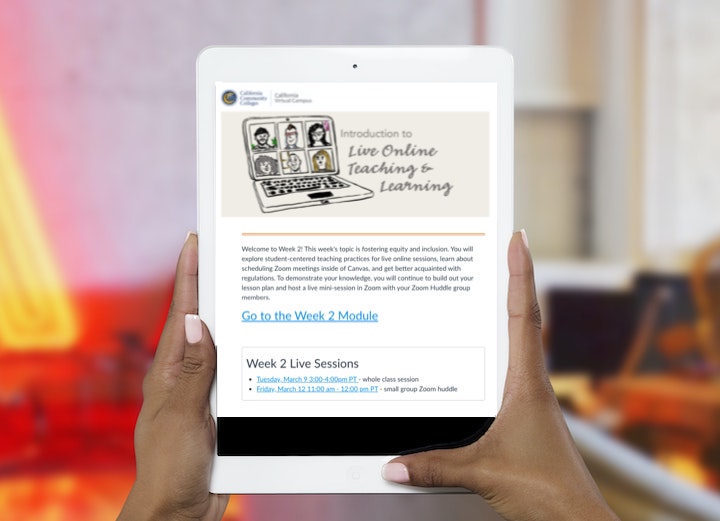
This is precisely why professional development is critical to guide faculty through the twists and turns of our dynamic instructional landscape. This month, in response to this emerging need, CVC/@ONE introduced its newest professional development course, Introduction to Live Online Teaching & Learning, a 2-week, facilitated course available to California Community College faculty and staff at the low cost of $45 with the option to receive one continuing education unit for an additional fee.
In the course, participants are immersed in the role of a student as they experience instruction that models the effective use of Canvas and Zoom to support learning at a distance. Participants work independently and in small group Zoom "huddles" to learn how to design and teach effective, inclusive live sessions with an ice breaker to check the emotional pulse of students or help them make connections with peers, direct instruction using screensharing, and active learning techniques using chat, polling, breakout rooms, and external tools like Google Docs, Slides, and Jamboard. Participants also engage in live class sessions in the role of "students" that model inclusive instructional practices. In one session, they participate in a lesson in empathy that requires them to complete a collaborative activity in a Zoom breakout room while attending from a smartphone. In the United States, Black and Hispanic adults are more likely to be smartphone dependent. When teaching at an open-access institution, teaching practices must be mobile-friendly to avoid perpetuating equity gaps.
Upon completion of the course, participants receive a digital badge that verifies their new skills. The two sections we scheduled for the spring are full ... but don't worry. We'll be offering more sections of the course this summer!
Adopt the Course!
Like all of CVC/@ONE's other professional development courses, we have shared our new Intro to Live Online Teaching & Learning course in the Canvas Commons with a CC-BY license, making it simple for your college to adopt, adapt, and offer the course locally for your faculty. To ensure the quality of your own local PD, we strongly advise that the local facilitator of an adopted course complete the course with us first. In your re-use of the course materials, please attribute California Community Colleges | California Virtual College. Sharing really is caring!
To adopt the new Live Online Teaching & Learning Course, go to the Canvas Commons and search for "CVC Adoptable." That will lead you to all of our adoptable courses.
If there's one thing we've learned from COVID, it is that effective, inclusive design and teaching are central to serving the needs of all students ... regardless of the modality of instruction.
We'd like to extend a special thank you to Francine Van Meter of Cabrillo College who contributed her expertise to the development of this new course. Francine will be retiring from our system in May and has left a tremendous legacy in distance education. You will be missed, Francine!
