
Creating Microlectures: A New PocketPD Guide for you!

Moving from Synchronous to Asynchronous Online Instruction
When you need to quickly shift from teaching in a physical classroom to teaching online, it may seem natural to stick with your hour-long lectures and deliver them using a synchronous tool like Zoom. But if we keep the needs of our diverse students at the center of our teaching and learning efforts, we must begin to shift our focus to designing asynchronous online courses because equitable learning environments are focused on removing barriers.
Asynchronous online learning provides students with the flexibility to learn at the times and from the locations that work best for them. Community college students comprise our most vulnerable populations who are also more likely to be essential service provider workers. Many of our students are working more hours than ever before and have taken on the financial responsibilities of family members who have become unexpectedly unemployed. Requiring students to be available at certain times on certain days adds a barrier to learning.
But a flexible schedule isn't the only benefit of asynchronous online learning. It also removes the social anxiety that many students feel in group settings that prevents them from asking questions. That psychological barrier is eliminated and replaced with the opportunity to rewind and review until their questions are answered.
And by using a mix of written materials and asynchronous videos to deliver instructional content to your students, you'll be supporting learning variability, which is a fancy way of saying, "Each human brain is unique and each person learns differently."
Warming Up to Microlectures
So if you are looking ahead and planning for your courses to be online, now is the time to consider developing microlectures – brief videos that are 5-minutes or less and focused on specific outcomes. Why should you consider microlectures? And how do you get started? Those are great questions!
We hope you will take some time to peruse the new CVC-OEI PocketPD Guide to Microlectures embedded below. It includes research-backed tips for designing your microlectures, a microlecture gallery with contributions from your CCC faculty peers, and an introduction to accessible workflows using simple video recording tools – including a smartphone!
The PocketPD Guide is created with Google Sites and has a handy button on the first slide that allows you to create your own copy of the slide deck. We've shared it with a Creative Commons-Attribution (CC-BY) license so you are free to adapt and re-use it with attribution to CVC-OEI.
View all of our PocketPD Guides!

Recordings of live ConferZoom sessions are sometimes used to allow students to watch a missed class session, to review an earlier session, or shared with a future class. Depending on who is shown in the recording, they may constitute educational records that are protected under the Family Educational Rights and Privacy Act (FERPA) -- the federal student privacy law. This guidance explains acceptable practices for utilizing instructional video and audio recordings.
The FAQs below contain some specific questions about recording instructional Zoom sessions. Additional information about photos, video, and audio recording under FERPA can be found on the US Department of Education FAQs on Photos and Videos under FERPA. If you have questions about your specific recording situation, contact your college’s Chief Instructional Officer.
Are video or audio recordings of lectures a protected student record?
If a recording includes only the instructor, it is not a student record and FERPA does not limit its use. If the recording includes students asking questions, making presentations or leading a class (other than TAs), and it is possible to identify the student, then the portions containing recordings of the student do constitute protected educational records. Educational records can only be used as permitted by FERPA or in a manner allowed by a written consent from the student.
What Recording settings should I select in my Zoom account to best ensure students are not recorded in the archive?
Before you schedule your meetings:
- Go to Zoom.us and log into your ConferZoom account.
- Click on My Account (upper right)
- In the left column, select Settings
- Select the Recording tab and choose the following settings:
- Disable Local Recording. For most instructors, recordings should be kept in the cloud and not downloaded to a local computer.
- If you wish to have a video of the speaker recorded during screensharing, enable Record active speaker with shared screen
- Disable Record gallery view with shared screen
- Disable Display participants’ names in the recording
- Enable Multiple audio notifications of recorded meeting, which plays an automated message whenever a recording is started, or a participant enters a session that is already being recorded.
When your meeting starts, keep your Zoom view set to Speaker View (as opposed to Gallery View). This ensures that only the person who is speaking appears on the screen, as opposed to recording a grid view of all attendees with webcams enabled.
Can an instructor require students to show their video during a Zoom session/recording?
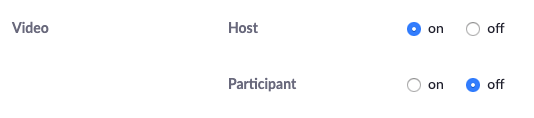
No. This is problematic for several reasons. Students may not have a webcam or may not want to show where they are located. When you schedule your meeting, you are advised to set Participant Video to Off to allow students to opt into sharing their video.
Can an instructor publicly share a screen capture of a Zoom session or recording that shows one or more identifiable students?
No. Unless FERPA compliance through use of consents has been given. Screenshots should not be shown on Facebook, Twitter, or any other public platform.
Can students publicly share class recordings or screen captures of a Zoom session or recording that show one or more identifiable students?
No. Instructors should tell students that they should not share the link to any class sessions, or take screen captures of Zoom sessions. Students that violate this request can be subject to the student code of conduct.
Can the instructor show recordings from last year’s class to the current class?
Under FERPA, this situation must be treated as if the recordings were being shown to a third-party audience which requires FERPA compliance through use of consents from identifiable students or by editing out those students from the video.
If the instructor wants to allow access to a video (that shows students participating) to others outside of the class, is this permitted?
Possibly. There are a couple of ways to use recordings that show students participating.
- The instructor may obtain individualized written FERPA consents from the students shown in the recording. This type of consent can be obtained on a case-by-case basis or from all the students at the outset of a class.
- Recordings can be edited to remove portions of the video that show students who have not consented to the use of their voice and/or image (simply blurring a student’s image and removing their name is not sufficient, as the student may still be identified).
What is the easiest way to comply with FERPA if I am video recording my class sessions, students will be asking questions/doing presentations, and I wish to share the recording with a future class?
- Record only the parts of your session that show you. Plan to hold specific Q&A periods during the session and when you get to one, click Pause recording.
When you are ready to present again, Resume recording. - Don’t refer to students by name (de-identifying the students removes the need for a specific consent from each student depicted). If a student happens to appear on camera, their identity can be edited out or written consent can be obtained.
- Videos of students giving presentations and student-generated video projects are covered by FERPA and copyright (students own the copyright of their work, just as any other author/creator). Therefore, written permission to use these digital works must be obtained by the student.
How do I obtain written consent from a student?
Check with your college to determine how to obtain written FERPA consent from students for instructional video recordings. Colleges are advised to have a digital consent form available to ensure it is not a barrier for students in online courses.
View Zoom's FERPA Compliance overview.
TechConnect (Confer) Zoom is supported by TechConnect and funded by the California Community College Chancellor's Office. It provides all CCC faculty and staff with an upgraded, Pro/Licensed Zoom Account. For more information and support, please visit the TechConnect website.
 This document by Michelle Pacansky-Brock and CVC-OEI was adapted from works by Erin Whitteck and Jingrong (Pearl) Xie of University of Missouri, St. Louis and Rice University.It is shared with a CC-BY-NC license. You are free to re-mix it without permission, provided you attribute the authors.

Encouraging students to use their phones in class is typically not a popular topic in higher education articles. However, when students need to unexpectedly transition from face-to-face to online learning due to an emergency like the coronavirus, a phone may be a student’s lifeline.
The California Community College (CCC) system serves roughly 2.1 million students. A 2019 study by the Hope Center found that half of CCC students surveyed experienced food insecurity in the last 30 days and 60% were housing insecure in the previous year. Students who are unsure about where they’ll get their next meal or where they will sleep at night are not likely to have the financial resources to purchase a laptop and they certainly are not going to have a desktop computer in tow. But according to a national survey by EDUCAUSE, 96.3% of community college students have a smartphone. And data from Pew Research shows that Americans who are younger, people of color, and low income are more likely to rely on a smartphone than broadband for online access. Smartphones are not luxury items for low-income students. They are critical tools that are used to pay bills, apply for jobs, participate in job interviews, conduct business, socialize with family and friends, shop, listen to music, watch tv and movies, and learn.
Recommendations for Faculty
Using Canvas to design a learning environment for your students is the place to start. And this archive of Shawn Valcarcel’s provides you with some great first steps. However, a Canvas course renders differently on a smartphone than it does on a computer. So, some special considerations must be made. This list is adapted from the Canvas Mobile App Design Consideration Checklist.
- Encourage students to download and use the Canvas Student App and provide a link to the Canvas Student Guide for iOS and Canvas Student Guide for Android.
- Organize content into modules and chunk content into smaller parts on Pages within a module. View the archive of Shawn Valcarcel’s Getting Started with Canvas webinar for support with this step.
- Use Text headers within modules to help guide student navigation. This is helpful because in the mobile app, students navigate your course content from the modules view.
- Use Canvas Pages to present content, instead of linking to external URLs or files. This prevents students from needing to download large files or view non-mobile friendly content.
- Write instructions and prompts that are platform-neutral. For example, avoid saying, “Click the blue Submit button at the top of the page,” as the mobile app does not have a blue submit button.
- Download the Canvas Teacher app and use it to navigate your course. Identify things that don’t work and provide alternative instructions for students on a mobile device or redesign these elements as needed.
- Design assessments with the tools on a smartphone in mind. They are handheld multimedia studios after all! Provide the option to record a video or audio file, take a photo, etc.
- Survey the external tools supported by your college. Many -- like VoiceThread and Pronto -- have a mobile app that students can download and use. These tools will also and open new mobile-friendly ideas for assessments.
Want to dig deeper? Make a copy of the Canvas Mobile App Checklist.
Recommendations for Colleges
In a state as economically diverse as California, it is critical for institutions to understand their student demographics and communicate resources to support mobile access during times of disruption. Here are a few recommendations for colleges to consider:
- Survey your students to identify their device ownership and ensure all faculty have this information.
- Provide students with a list of local venues and areas that provide free WiFi access to support students with limited data plans.
- Provide students with a list of internet providers offering free service during times of instructional disruption. See this list of Reduced Cost or Free Internet Access offers from CVC-OEI.
Visit the CVC-OEI Emergency Preparedness resources for more support through this transition.

The Learning Never Stops: Preparing to Teach in an Emergency
Emergency power shut-offs. Fire evacuations. Pandemic quarantines.
The list of emergencies that could require you to temporarily move your course online seems to be growing every day. CVC-OEI provides a robust set of instructional resources for Canvas and online course design that can aid faculty, administrators, and instructional support staff with the transition of on-campus courses into the distance education modality.
Don't wait for disaster to strike - check out these resources and prepare now.
CVC-OEI Emergency Preparedness Resources: Planning for uninterrupted instruction and student support in the event on-campus courses need to temporarily move online.
Course Design Rubric: The CVC-OEI Course Design Rubric can be used as a checklist for instructors who are moving instruction from the classroom to the Canvas common course management system. The Rubric guides instructors on setting up a course with clear navigation, regular effective contact, effective assessments, and accessibility compliance.
Canvas Support Portal: This one-stop resource includes links to the CCC Canvas Home Base, a Canvas Community where users can access text and video user guides and post questions to the Canvas Community.
Byte Sized Canvas Videos: These short, desktop video tutorials provide pedagogical and technological tips on the use of Canvas.
Student to Student Interactions This Pocket PD Guide shows instructors how to meet the student-student interaction requirement that is now part of the Title 5 Education Code for California Community College Distance Education courses (Instructor Contact, Section 55204).
Adoptable Courses: Colleges needing to quickly prepare faculty to teach online in the case of an emergency can download courses from CVC-OEI/@ONE and adapt them to use locally. Fourteen “CVC-OEI Adoptable” courses can be found in Canvas Commons, including Introduction to Online Teaching & Learning, Introduction to Course Design, and Introduction to Designing for Accessibility.
On October 25, 2019, CVC-OEI/@ONE hosted the third annual Can•Innovate conference, to support the effective design and teaching of online courses through the use of Canvas. The first conference, in 2016, was held on-site at American River College. In 2018, the decision was made to convert the event into a free online conference to reach more faculty (particularly part-time faculty who often do not have funding to attend conferences), staff, and administrators.
The 2018 event was very successful, with more than 1,000 attendees and an overall satisfaction rate of 4.4 out of 5 stars. For a thorough debrief, read our summary article from last year. This year, the Can•Innovate scaled even further, reaching more than 1,400 people with an overall satisfaction rating of 4.5 stars. Our program included a keynote by Kona Jones, a national thought leader in online education, and a spotlight session by Jory Hadsell, Executive Director of CVC-OEI. Dr. Hadsell provided an overview of the impact CVC-OEI is having in the California Community College system to increase student access to high quality, fully supported courses. This includes increasing the number of quality badged online courses through local Peer Online Course Review (POCR) and the expansion of the CVC Exchange Cross Enrollment Link (ExCEL).
Our @sdmesacollege #CanInnovate19 group viewing room! Swag giveaways and padlet takeaways here: https://t.co/oDu8xq1KaE Yay!! pic.twitter.com/dVUc3aE84W
— Katie Palacios (@katiepala) October 25, 2019
The growth in attendance, however, did not come from our online audience. Rather, it is attributed to the significant increase in the number of colleges that coordinated a group viewing room. In 2018, 32 colleges held a group viewing room (and we also had 5 regional hubs). In 2019, we chose to eliminate the hubs and focus on providing more support resources for group viewing room coordinators. In 2019, the number of viewing rooms increased to 65 (a 103% increase).
Within the attendee demographics, we saw the largest increases in full-time faculty (639, 37% increase from 2018), part-time faculty (493, 32% increase from 2018), and administrators (101, 30% increase from 2018) and a 16% increase in classified staff (147). These numbers demonstrate the value of free, online professional development.
Thanks for coming out for #Caninnovate19 today, Laney and COA Distance Ed rockstars. And thanks to @ONEforTraining for putting together an inspiring conference! @PeraltaColleges @Laney_College @coacommprof pic.twitter.com/y33VWikp01
— Chelsea C (@chelseamcohen) October 25, 2019
Here is a detailed overview of the attendance data from Can•Innovate 2019 if you'd like to dig in deeper.
Thank you to everyone who played a role in the success of Can•Innovate this year. We had excellent speakers who volunteered their time to share their teaching practices, as well as session hosts and co-hosts (including many volunteers from colleges), behind the scenes support members, and a statewide advisory committee who worked tirelessly to coordinate the event.

The CVC-OEI will not be coordinating a centralized CCC Digital Learning Day program in February 2020. However, there are many ways your college can still be part of this national event. Here are a few ideas:
- Use the @ONE Teaching with Adobe Spark Pocket PD Guide to coordinate a group viewing of the archive, Making Creativity SPARKle in Teaching and Learning, view examples of Spark videos, and challenge faculty to create a 2-3 minute video clarifying a sticky concept from their course.
- Use the @ONE Student-to-Student Interactions Pocket PD Guide to present an overview of the value of social learning online and design creative ice breakers with faculty using the samples shared in the guide.
- Use the @ONE Teaching with Google Maps Pocket PD Guide to coordinate a group viewing of the archive, Mapping Content and Contexts with My Maps and Tour Builder by Google, and then challenge faculty to contribute to your own collaborative map or design a personalized tour of a location that is relevant to their course content.
- Keep your eyes on the national Digital Learning Day map and attend a nearby event.
If you have any questions, please send an email to support@cvc.edu.
This week, at the Online Learning Consortium Accelerate conference, the Professional Development Team of the California Virtual Campus-Online Education Initiative is being honored with the 2019 OLC Award For Excellence In Faculty Development For Online Teaching.
This award recognizes an OLC member institution that has developed and delivered an outstanding, comprehensive program for faculty professional development in online teaching. Please join me in congratulating the @ONE team, who support student success in the California Community Colleges (CCC) every day through the development of strong, effective online teachers:
Stacey Carrasco, Senior Program Coordinator
Karen Oeh, Program Coordinator
Michelle Pacansky-Brock, Faculty Mentor for Online Teaching & Learning
Helen Graves, Instructional Designer
Cheryl Chapman, Instructional Designer
Shawn Valcárcel, Instructional Designer
We also want to recognize the “A-Team” - the accessibility specialists who have been working with us since 2016 to make hundreds of online courses from across the system more equitable for students with disabilities:
Marisa McKnees
Shawn Jordison
Mark Mintz
The talented team above could not serve 60,000 CCC educators across 72 districts without a real online network of educators bringing their expertise, passion, and dedication to the services we provide. Our course facilitators and our Course Design Academy reviewers all work in our system - as full-time and part-time instructors, counselors, instructional designers, Distance Education Coordinators, administrators, and Canvas admins - and all bring their understanding of our students and our mission to their work. Whether you are an experienced CCC online instructor or hoping to be, you can’t find better partners to guide and mentor you as you refine your online teaching practice than the folks who contribute to @ONE:
Aloha Sargent Cabrillo Kim PippaTonnesen Columbia College
Amy Evangelista Coastline Kristin Smith City College of San Francisco
Angela Drumm Mt. San Jacinto Larry Green Lake Tahoe Community College
Arnita Porter West Los Angeles Leslie Easton San Diego City College
Audrey Blumeneau Cabrillo Leslie Reeves American River College
Belen Torres-Gil Rio Hondo Lisa Sayles College of the Redwoods
Brianna Kuhn San Diego CCD Margaret Phelps Ventura College
Carly Zeller College of the Siskiyous Maria Fernandez College of the Siskiyous
Carolyn Fiori San Mateo Maria Mendoza-Escobedo Coastline
Catherine Hillman Cuesta Maritez Apigo Contra Costa College
Catherine McKee Mt. San Antonio Matt Vasques Cuesta College
Chelsea Cohen Laney Matthew Mooney Santa Barbara City College
Christi Blauwkamp Copper Mountain Mayra Gomez Mt. San Jacinto
Christine Dobrowolski Redwoods Meg Phelps Ventura College
Colleen Harmon Cuesta Michele Alaniz City College of San Francisco
Cynthia Wilshusen Cuesta Michelle Macfarlane Sierra College
Damaris (DJ) Hawkins Riverside CCD Mike Smedshammer Modesto Junior College
Dennis Cambara Chaffey Monica Z. Eastridge Mt. San Jacinto College
Dipali Buch Folsom Lake Nadia Sayeh San Diego City College
Donna Eyestone City College of San Francisco Pat James MSJC, OEI (ret.)
Dyan Pease Sacramento City Paul Burwick Shasta College
Elizabeth Morgan College of the Desert Sandra C. Haynes Pasadena City College
Fabiola Torres Glendale Scott McAfee College of the Canyons
Francisco Corchado Hartnell Steven Rodriguez Pasadena City College
Gregory Beyrer Cosumnes Suzanne Wakim Butte College
James Glapa-Grossklag College of the Canyons Sylvia Amitoelau Coastline Community College
Jennifer Kattman Sierra College Teresa Borden Columbia College
Jennifer Pakula Saddleback College Tracy Schaelen Southwestern College
Joanna Miller Contra Costa CCD Tracy Stuntz Clovis College
Kathy Arnold West Valley College Vanessa Chavez Rio Hondo
Katie Conklin West Hills Vernon Martin Sierra College
Katie Palacios San Diego Mesa Veronica Van Ry Taft College
Ken Cooper Los Rios CCD
Finally, we owe a debt of gratitude for the support of our Executive Director, Jory Hadsell (CVC-OEI); our Executive Sponsor, Joe Moreau (Vice Chancellor of Technology for the Foothill-De Anza Community College District); and the leadership of the California Community College Chancellor’s Office.
If you want to learn more about the work of the entire @ONE team, you can view this brief (4 min) overview video, visit our website, or follow @CVCOEI and @ONEforTraining on Twitter!
Thank you to everyone who has supported online teaching and learning in the California Community College system through @ONE and CVC-OEI!
Sincerely,
Autumn Bell
Director of Professional Development, CVC-OEI/@ONE
abell@cvc.edu
Last October, Ali Olson-Pacheco, an Instructional Technologist and Designer at Ventura College, received the weekly email communications counting down the days to Can•Innovate. Ali was excited about Can•Innovate, which is an annual free, online conference for Canvas users in the California Community College system coordinated by @ONE, the professional development team for CVC-OEI. Ali was excited about the idea of attending Can•Innovate with her colleagues in the Ventura College viewing room; however, she had one commitment that was a bit more important. Ali was pregnant and Can•Innovate was the same day as her due date.
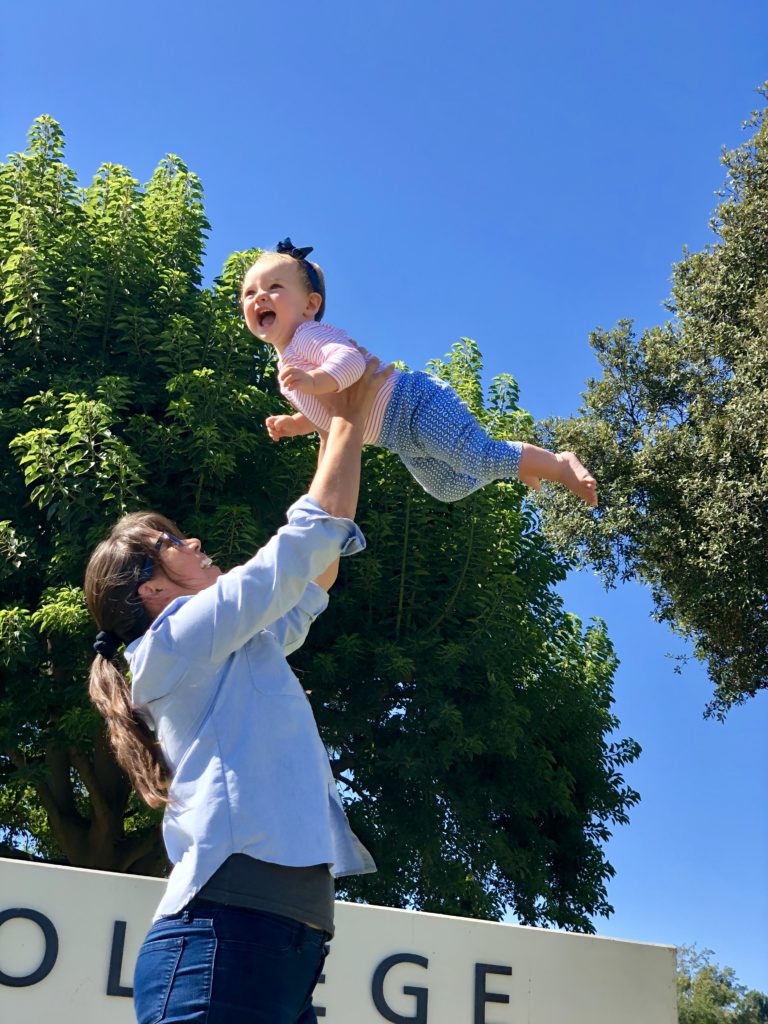
“I had serious FOMO. I really wanted to be there but also knew it was unlikely that I would be able to,” Ali shared. As the big day got closer, she registered for a few sessions thinking if she did go into labor, viewing the sessions from her laptop in the comfort of her home would be a good way to distract her from the stages of early labor. Although she wouldn’t be in person with her peers, she would still be able to be part of the event. Well, it happened. When Can•Innovate started, so did Ali’s labor. She stuck with her plan and attended sessions during the day before she went to the hospital. Ali recalled one session she attended in which John Lacivita, one of the speakers of the Namecoach session, presented from his newborn’s nursery. She shared, “I enjoyed learning about Namecoach, which my college had just implemented, and it was also nice to attend a conference and see the human side of a presenter like that.”
As the day progressed, so did Ali’s labor and she went to the hospital before the conference ended. Her healthy daughter was born the next afternoon at 2pm. While Ali was on leave from her role at Ventura, she watched several of the conference archives. “I wasn’t required to watch the recordings. I was just really interested in the topics and wanted to learn about them. It was nice to come back from maternity leave with some new ideas inspired by Can•Innovate,” she shared.
Equitable Professional Development
Professional development is key to spreading effective practices and inspiring educators to make changes in how they teach. But relatively few educators possess the resources to travel to conferences. Ali’s story highlights the importance of providing untethered professional development opportunities for faculty and staff that remove time and place as barriers. Last year, more than 1,100 people attended Can•Innovate -- from college campuses, family rooms, the beach, coffee shops, and beyond. And the archives have been viewed 2,000 times in the ten months following the 2018 event.
Get Ready for Can•Innovate 2019
We hope Ali’s story inspires you as much as it has inspired us. We also hope it gets you excited to attend Can•Innovate this year on Friday, October 25, 2019. FREE registration is now open! And there's still time to host a viewing room on your campus.

I am a big fan of stories about people who have accomplished extraordinary feats. The majority of books, articles, and films that top my list are about their lives. Their stories inspire me, how they rose above impossible challenges and thrived. Some of my biggest inspirations include Katherine Johnson, Mary Jackson, and Dorothy Vaughan. These three African American women were pioneers in mathematics, engineering, and computer programming. Their contributions helped build the cyberspace world that many of our livelihoods depend on. Pfc. Desmond T. Doss, a conscientious objector, signed up to serve in World War II as a medic. In one battle, he rescued 75 wounded men from the battlefield. What did they do to be able to lead such extraordinary lives? Was it superior intellect or special gifts? Was it positive thinking, or grit and tenacity? Was it an opportunity or emotional intelligence?
When I was first offered the class ...
As an adjunct music instructor, I taught a beginning voice class a few years back. When I was first offered the class, I was hesitant to accept because I did not feel I was the most qualified. But I was not in a position where I had many, or any options to choose from, so I accepted. I quickly discovered that the real challenge would not be my ability to teach singing, but my ability to help students deal with self-doubt. In a typical beginning voice class, the primary directive is to sing. Each week, students sing in front of their peers and the instructor. For each performance, they receive feedback and a grade. Students are to perform using their individual voice, with minimal accompaniment. This means no singing with others, with recorded vocals, or to a background track set at a loud volume.
I began my quest to enlightenment.
Many say that the worst human fear is public speaking, but in my experience, it is the next worse. Although I taught breathing and articulation, I focused my efforts on dealing with stage fright. I suspected that many of my students at some point in their lives were told they couldn’t sing, or sing well for that matter. I knew that to facilitate this class successfully, I had to make a critical decision. That decision was to genuinely believe that every single student who came through my class had the capacity and potential to not only sing but sing well. I knew that if I committed myself to that belief, I would be going against the popular opinion of “You either have it or you don’t.” I knew that my biggest challenge would not be to face outside opinions but to face the inward opinions of each individual student and what they believed was possible for themselves. I began my quest to enlightenment. Then one day, it happened. I experienced a much-anticipated epiphany. During one class session, as I was delivering my typical pep talk to the class, I heard the following words in my mind:
“You don’t know you can’t.”
Quickly I wrote it on the whiteboard, then stared at it. “Is that right?” I did my best to understand what I had just written, but understanding eluded me. I don’t remember looking at my students’ faces, but I could sense that they too were trying to make sense of it. Slowly, students began to respond with various expressions that basically translated to “I think I get it, but maybe explain.” As a typical instructor, I attempted to explain the simple five-word phrase with deep insight and elaborate speech. I began by first reading it aloud, with emphasis!
- “You don’t know you can’t!”
- Well, what does that mean? Well, I, uh, I don’t know.
- I don’t know.
- Hmm. Wait, maybe that’s it. In fact, that’s precisely it! I don’t know. I really don’t know!
- Wow, what a relief for someone who is always expected to know!
I don’t know you can’t. I don’t know any of you can’t. Actually, now that I think about it, I really don’t know, despite all my years working on music degrees, my experience as a musician, teaching seemingly every music course offered by CCCs for any college that would offer me a class! I really wasn’t qualified to decide what anyone could not do. So if I am not qualified to make that decision, I dare say that neither are you! You really don’t know you can’t. You can tell yourself that you can’t, in which case you increase your chances of not, but you just really don’t know. So now what are we left with?
I began to see a change
If I don’t know I can’t, then there is the possibility that I can. And the only way to find out if I can is to do and keep doing. What’s the worst that can happen in that case? I spend my time and effort working on something I actually enjoy doing, and most likely I will get better at it the more I do it. So I am less concerned with what I can’t do because I really don’t know, and more concerned with discovering what I didn’t know I could do! After that class, I began to see a change. Progress was slow and gradual, but highly rewarding. Students began to step out and take more risks. For most, stage fright was still something they would have to battle each week. But there was more of a mindset that they were not going to allow that fear or anything else from discovering what they could do.
We must decide what we believe
As educators, we must decide what we believe about our students’ abilities. Do we believe all learners are capable? Is that belief genuine? Maybe not, but regardless we are all faced with the challenge to make a genuine decision about what we believe, and commit to that belief. I was able to commit by discovering the truth–that I really do not know what anyone cannot do, and that includes me. Another truth that I have discovered is time keeps moving forward no matter what you believe. So what do people like Katherine Johnson, Mary Jackson, Dorothy Vaughan, Desmond Doss, and so many others throughout history have in common? I don’t know all of it, but one thing I believe that they decided to “don’t know they can’t.”

Happy New Year!!
Yes, that is what I meant to write. I know it’s July, but we operate on a July-June fiscal year, so this is the time the @ONE (Online Network of Educators) team reflects on last year’s work and gets ready to tackle a new set of goals. And we couldn’t be happier that we are entering the new year with two new instructional designers - Liz du Plessis and Shawn Valcárcel!
Liz du Plessis was the instructional designer at Santa Rosa Junior College for three years before more recently working for the fully online college (“CalBright”). Liz has been active with @ONE as a facilitator and presenter and is also an adjunct history instructor. Shawn Valcárcel comes to us from Mt. San Jacinto College, where he worked as an instructional designer. He is also a part-time online music instructor and has worked with @ONE in the past. Shawn and Liz join our current Instructional Designers, Helen Graves and Cheryl Chapman. You can see profiles and contact info for all of our team on our website.
Highlights from Last Year
Thanks to the hard work of our entire PD team and the CCC educators who facilitate our courses, contribute to Pocket PD articles, and serve as course reviewers, we were able to bring you the following in 2018-2019:
- An additional 21 online PD courses compared to 2017-2018, including additional courses on Equity & Culturally Responsive Teaching and Humanizing Online Teaching & Learning.
- A 20% increase in people taking and completing @ONE courses over the previous year.
- 2 free, online conferences, Can•Innovate and Digital Learning Day, lead by Michelle Pacansky-Brock, that reached more people than the past 3 years of monthly desktop webinars combined.
- 5 new self-paced courses on accessibility available through @ONE as a result of our partnership with the CCC Accessibility Center.
- An additional 103 courses aligned to the CVC-OEI Course Design Rubric through Course Design Academy, bringing the total so far to 232 courses!
A Look Ahead
And those are just some of the things our team has been working on! Here are two more:
Adoptable @ONE Courses are now in the Canvas Commons
Many of you have asked for copies of our courses so that you can use them as part of your local professional development programs. Helen Graves has been hard at work to respond to this need. Thanks to Helen, you can now find nearly a dozen CVC-OEI/@ONE adoptable courses in the Canvas Commons, including some of our most requested four-week courses, courses to support peer online course review and use of the rubric, and the self-paced accessibility courses brought to us by the CCC Accessibility Center. To find these adopable courses:
- Log into your college’s instance of Canvas
- In the global navigation menu, select Commons*
- In the search box at the top, enter “CVC-OEI Adoptable”
Please note: Our adoptable courses are licensed with CC-BY license, which means you're free to adapt them provided you attribute CVC-OEI.
*If you do not see a link to the “Commons” in your Canvas menu, contact your campus Canvas Admin to request that this feature be enabled.
New Names for Our Certificates
@ONE has gone through changes over the last three years, and so have our certificate programs. Several years ago, we replaced the original Online Teaching Certification with the Course Design Fundamentals Certificate. In 2017, we also introduced a second certificate in Online Teaching Principles. Since then, we have heard from many folks that it’s no longer clear which certificate is the right one to use for “certifying” faculty to teach online, or which one DE Coordinators should recommend to new faculty.
We hope these small changes we’ve made to the names will help clear up any confusion:
Certificate in Online Teaching & Design
Formerly: Certificate in Course Design Fundamentals
We recommend this program for preparing/certifying faculty to teach online and to prepare staff and instructional designers who support online teaching. The certificate prepares participants to develop and teach effective, interactive, and accessible courses that promote student retention and success.
Cheryl Chapman is leading a project this summer to redesign the 12-week Online Teaching and Design (OTD) course. It will continue to be one option for participants to earn the certificate, although Online Teaching and Design course may have a new name after the redesign! Look for a launch of the updated “OTD” in the fall.
Advanced Certificate in Online Teaching Principles
We’ve added “Advanced” to the title of this certificate to reflect that we recommend this certificate for experienced online teachers, DE support staff, and instructional designers who are ready to explore how their humanized presence in the course along with culturally responsive and dynamic teaching practices can positively impact students.
Join Us!
While you are learning more about our certificate program, we invite you to put in your proposal for Can•Innovate 2019 and mark your calendars for October 25! Also, see what your CCC colleagues are talking about on Twitter using the hashtag #CCCLearn.
There are so many great things happening in our system right now and we want you to be a part of the conversation!
Learning is a social process. That's why active learning has long been touted as an exemplary instructional approach for college classes -- whether they're taught in a traditional classroom or online. It's also why student-student interactions are part of the CVC-OEI Online Course Design Rubric and are now part of the Title 5 Education Code for California Community College Distance Education courses (Instructor Contact, Section 55204). Peer-to-peer interaction is foundational to developing a sense of community in your online courses. But meaningful interactions don't just happen; they are fostered through effective course design and teaching.
Neuroscientists like Antonio Demasio have shown that thinking and feeling are not distinct processes. Rather, feelings directly impact human reasoning and behavior. Thinking and feeling are inseparable from one another. And if you apply that to the way you teach, you'll notice big shifts in your students' engagement. Research shows that online classes can make some students feel more isolated, which can further exacerbate the feelings of stress and marginalization that many community college students experience. Throughout their lives, many of our students have been informed through the media and other messages that they're not cut out for college. It's your job to let them know, "I believe in you. You've got this." Just like in your face-to-face classes, validating your online students and establishing that your class is a safe place are the first steps to establishing a sense of belonging for your students (Rendón, 1994).
Providing low-stake opportunities that enable students to draw upon the wealth of experiences they bring to your class is also key. Doing so demonstrates that you value your students' diverse experiences and perspectives, as noted in the Peralta Equity Rubric. As students share what's meaningful to themselves, they will feel more included in your class and will also recognize things they have in common with their peers. When names on a screen begin to transform into human beings with rich stories, your class is on its way to becoming a community.
To support you in your efforts to foster student-student interactions and build community in your online courses, CVC-OEI/@ONE has developed a Student-Student Interactions Professional Development Guide, which you'll find embedded at the top of this page. We've shared the guide with a Creative Commons-Attribution (CC-BY) license and provided it in Google Slides format to make it easy for you to copy, adapt, and re-use as you'd like. In the guide, you'll find:
- References to research that will help guide meaningful conversations with your faculty peers about the recent Title 5 change,
- Recommended CVC-OEI/@ONE courses and PocketPD,
- Video tours of online courses showcasing assignments in Canvas,
- A collection of assignment ideas, shared by California Community College faculty
Leave a comment below to let us know what you think and how you plan to use the guide or share your favorite strategy for fostering meaningful interaction in your online course.

Can•Innovate 2019 is scheduled for October 25, 2019, and we're ready to make this year's event bigger and better than last year but we need your help! Can•Innovate, a free, one-day conference supporting faculty and staff at the 114 California Community Colleges that use Canvas (registration is also open to the general public). Last year, more than 1,100 people joined in for a collaborative day of sharing and learning. Participants have the option to attend online from anywhere or on-campus from a group viewing room so mark your calendar today and start preparing your proposal.
The Call for Proposals for Can•Innovate is now open -- here's your chance to reach inside your bag of tricks and share a course design or teaching practice in a brief Lightning Round or a more detailed Share Showcase. All sessions are delivered online so there's no need for travel funding -- or a suitcase! Take a peek at last year's program for a little inspiration.
Announcing our Keynote Speaker

Kona Jones, Director of Online Learning at Richland Community College will kick off our program with an inspirational presentation, Integrating Compassion into Your Teaching. Kona is responsible for the development of faculty and student technology training materials, provides instructional design support to faculty, oversees the assessment of online courses, and facilitates faculty professional development. Kona loves teaching and is an adjunct instructor of statistics and developmental psychology. Her passion is student success and in 2019 she was awarded Adjunct Faculty of the Year. Kona is also a Canvas Coach and Canvassador, contributing extensively in the online Canvas Community and elsewhere.
Registration will open in September when the full program is announced. If you have any questions about Can•Innovate, let us know!
